Google’s reach may extend across the world, but for some local searches, users need a trusted solution in their own neighborhood (and quickly)!
Local service advertisers want to convert these searchers into leads fast, as with most local service inquiries, time is of the essence. Luckily, Google’s Local Services Ads (via Performance Max campaigns using a pay per lead goal) can come to the rescue.
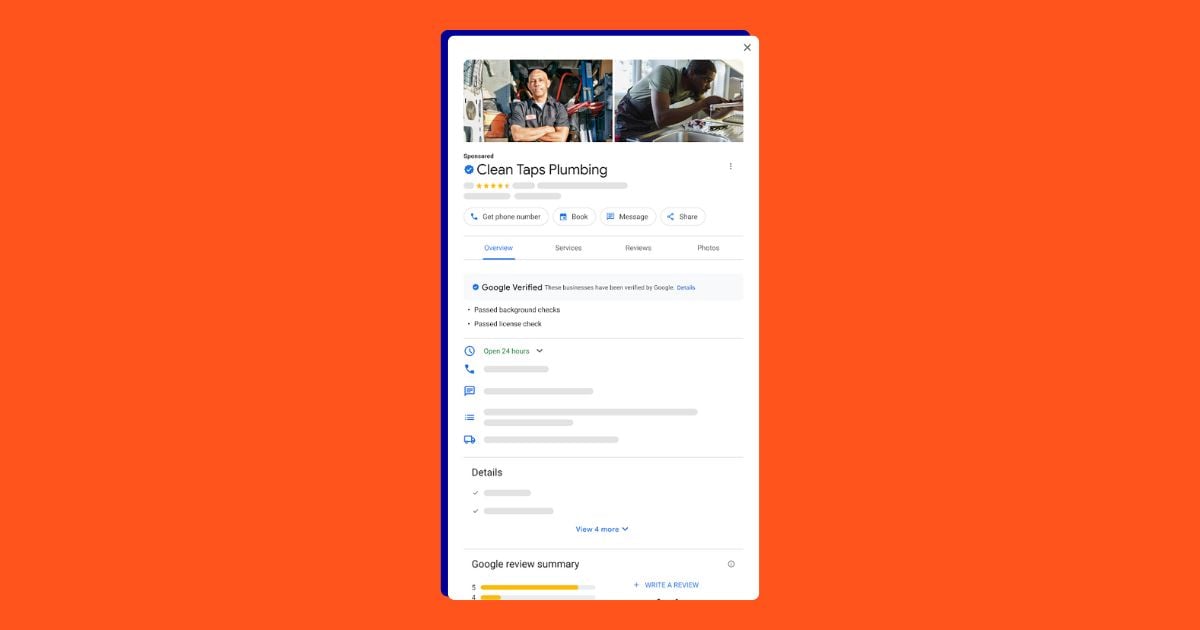
They allow local service advertisers to shine on the SERP with a unique ad type that shows service offering options, ratings, and searchers can take action directly on the ad without having to click off—making lead generation a breeze. In this article, we’re covering everything you need to know about Local Services Ads (LSAs) to make the most of them for your business.
Contents
What are Google Local Services Ads?
Google Local Services Ads are a special type of PMax campaign ad that allows service-based businesses to run ads meant to generate leads directly on the search results page. Rather than linking to a landing page like traditional Google Ads, LSAs are meant to drive calls, form fills, messages, or appointment bookings directly from the ad. Specific industries such as locksmiths, plumbers, garage door professionals, electricians, lawyers, real estate agents, and many more can take advantage of this Google Ads type.
When a searcher enters a local search query, they may see several trusted professionals in their area positioned right above the traditional paid search ads; these ads show a business number, hours, ratings, and reviews.
For example, an LSA might look like this:
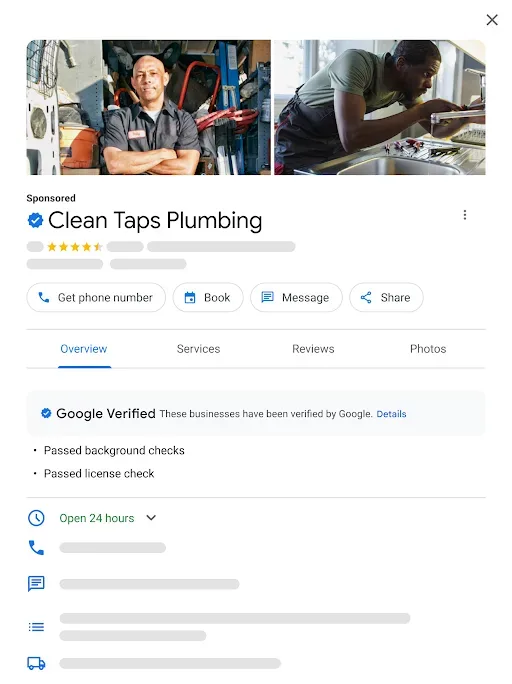
Upon clicking on a local advertiser’s listing, Google prompts them to confirm the job they’re looking for as well as their service area. If you fit the job and serve that area, you’ll be matched to the searcher, and they’ll be able to review your qualifications, ratings, and Google reviews before contacting you.
If you’re not a good fit for their job or you don’t serve their region, then Google will save you the costs and burdens and will connect them to a more appropriate Local Services Ad.
🚨 Are you making the most of Google Ads? Find out using our free Google Ads Grader tool!
Local Services Ads industries
Local Services Ads are a dream come true for some industries. Today, Google fully supports Local Services Ads all across the United States for more than 80 industries, including:
- Appliance repair
- Carpenter
- Carpet cleaning
- Cleaning service
- Electrician
- Foundation pro
- Garage door pro
- Home inspector
- Home security
- HVAC
- Landscaper
- Mover
- Pest control
- Plumber
- Pool cleaning
- Tree service
- Window repair
- Financial planner
- Tax specialist
- Real estate agent
- Bankruptcy lawyer
- Business lawyer
- Estate lawyer
- Beauty school
- Dance instructor
- Driving instructor
- First aid training
- Massage school
- Preschool
- Tutoring
- Child care
- Funeral home
- Animal shelter
- Pet adoption, boarding, grooming, and training
- Veterinarian
- Dental
- Acupuncturist
- Personal trainer
- Yoga studio
- Weight loss center
Benefits of Google Local Services Ads
Still wondering if Google Local Services Ads are right for your business? Let’s review some of the benefits of this specific ad type.
Advertisers pay per lead–not click!
PPC advertisers know the pain of paying for a click that isn’t a good fit or doesn’t convert—especially for businesses with high average costs per click, like attorneys and dentists. Google’s Local Services Ads help connect the right job to the right advertiser and prevent the job mismatch that often happens when a user searches for broad terms for a very specific job or for an area outside your service zone.
Businesses running Local Services Ads are only charged for valid leads, and depending on the job and the market, these can end up being even lower than the average cost per lead for search ads in your industry. If you receive a lead that is either fraudulent, spam, or a poor match, you can even dispute the charge for credit.
Plus, the Google Local Services Ads average cost per lead is about $60—which is significantly lower than the search ad benchmark average cost per lead of $66.69.
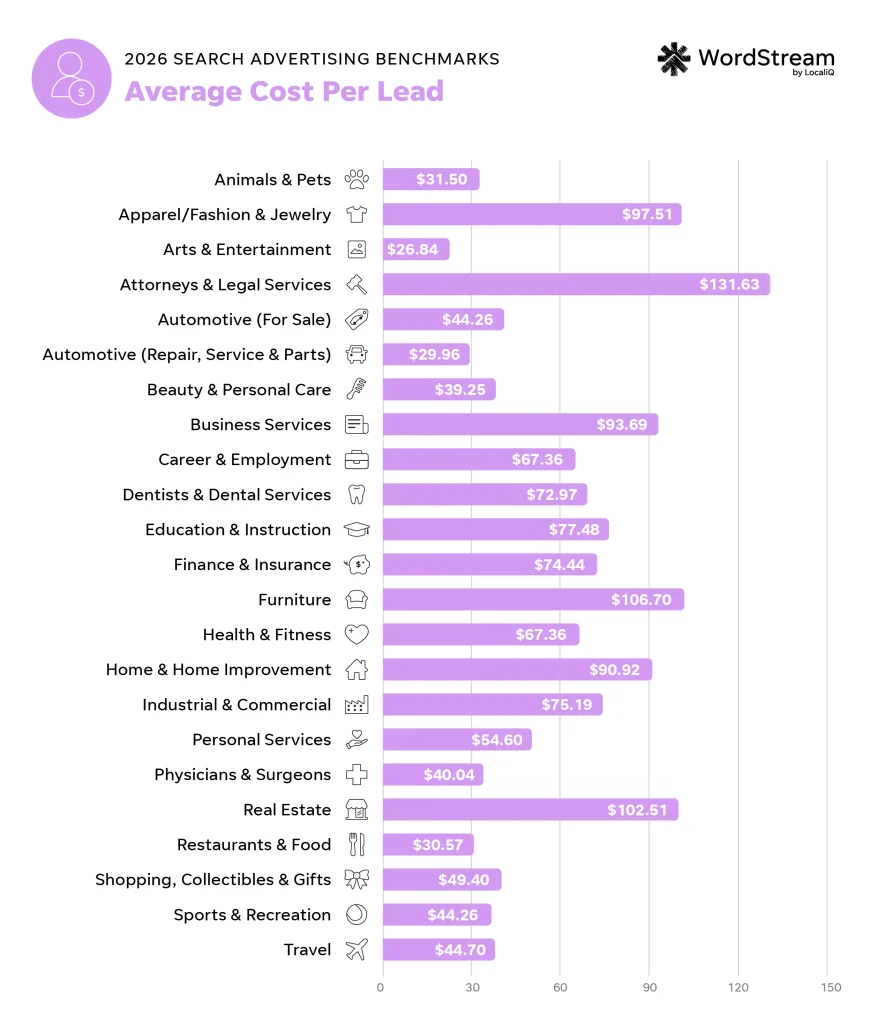
💡Find out how your search costs can compare to your current LSA costs using our latest search ads industry benchmarks!
Gain trust with the Google Verified badge
When eligible, the Google Verified badge will automatically appear on your LSAs, adding an extra dose of credibility. Before October 20, 2025, LSAs used to have multiple different badges (like the Google Guarantee) depending on their industry and level of verification. However, that has since changed, and all LSAs now have the Google Verified badge instead.
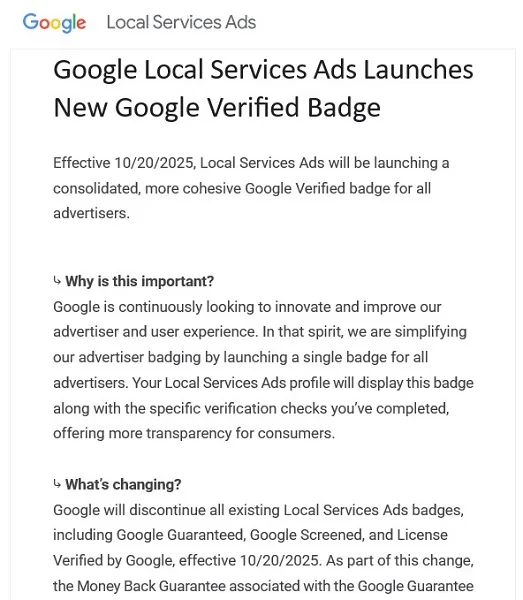
This Google Verified badge is meant to provide a more consolidated, cohesive, and transparent LSA experience for both users and advertisers.

Expand the reach of your paid search ads
You’ll notice that Google Local Services Ads sit above the paid search ads and the organic listings.
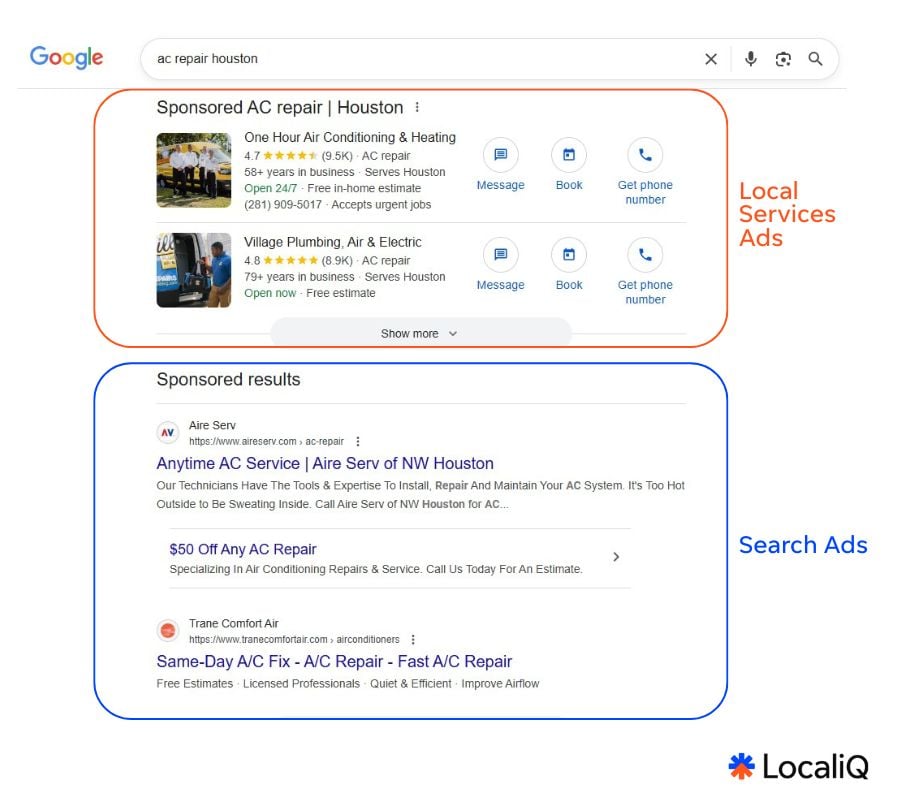
That’s because Google Local Services Ads aren’t meant to replace your traditional search ads or even your organic local listings.
Some searchers still turn to Google and expect to visit your website before deciding if you’re the best provider for their business. Even if they don’t convert via LSAs, their prime position on the SERP and user reviews may change how people convert later on.
Easy management with PMax
LSAs have moved directly into Google Ads under Performance Max campaigns with a new pay-per-lead goal. That means you can run LSAs without having to leave Google Ads (as they were previously in a separate dashboard). Most advertisers are already taking advantage of the fully-automated PMax campaign type. So now, you can work with LSAs using PMax campaigns (when assigned a pay-per-lead goal), which is a campaign type you might be already comfortable and familiar with.
How to get started with Google Local Services Ads
Ready to try out Google LSAs? Here’s how to get started.
1. Confirm your eligibility
Google’s Local Services Ads are only available for certain industries (which we outlined earlier). To find out if you can connect with your customers through Local Services Ads, first confirm your business type and location here.
If you’re eligible, you’ll be guided through creating an account to manage your Local Services Ads. Local Services Ads are managed separately from the ads you create in Google Ads, so you’ll need to create a new account.
2. Create your business profile
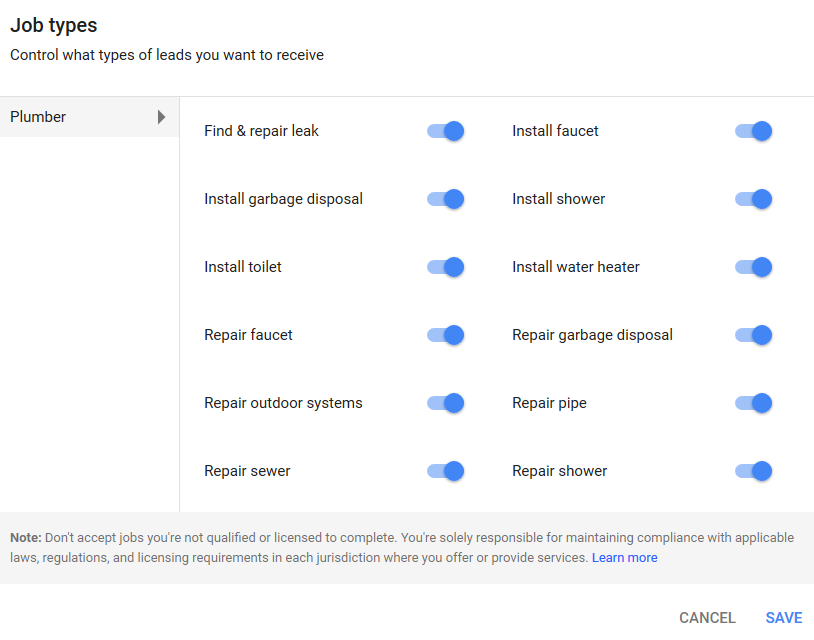
To run LSAs, you’ll need a Google Business Profile account and link it to your Google Ads account. Your Local Services Ads business profile will determine which jobs are matched to your business. Be honest about what kind of services you can perform as well as which areas you want leads in, as you’re agreeing to potentially pay for any match leads from your Local Services Ads.
From your business profile, you can edit:
- Your weekly budget
- Your business hours
- Your service areas
- Your job types
3. Add your license and insurance details
If you’re a licensed and insured professional, you’ll need to submit proof. Be sure your paperwork is up to date, and then provide your general liability insurance details as well as your related professional licenses.
If your city or state requires additional licenses, you can add them here as well to ensure you’re compliant in those regions.
4. Complete a background check
Before Google starts sending people into its users’ homes, offices, and cars, it wants to be sure its users are safe and can always trust the Local Services Advertisers covered under the Google Verified badge. For this reason, Google requires businesses and their fieldworkers to pass a background check.
There is no cost for these background checks, and you can manage them here.
5. Manage your leads
Once your business profile is complete and linked to your Google Ads account, you’ll be able to have a PMax pay-per-lead campaign created in your account. Once this is up and running, you can see the leads your campaign yields in the leads reporting section of the Google Ads platform.
Remember that leads aren’t necessarily booked jobs! Be sure to follow up with your inbound leads. After selecting an individual lead, you can review the details of the lead, including the job type and location, as well as listen to the recording of the call.
How to make your PMax Local Services Ads more effective
These two quick tips for running Google Local Services Ads with PMax campaigns can make a big difference in ROI.
1. Be mindful of the locations you target
Each pay-per-lead PMax campaign running LSAs includes the usual settings, like location targeting. Of course, having the right location settings on your LSA PMax campaign is critical, since the point of this ad type is to reach local searchers.
For example, if you serve multiple locations, be sure the locations you choose to target are in close proximity to your main prospect hubs (i.e, where you’ll have a higher likelihood of benefiting from the proximity ranking factor).
2. Keep your Google reviews up
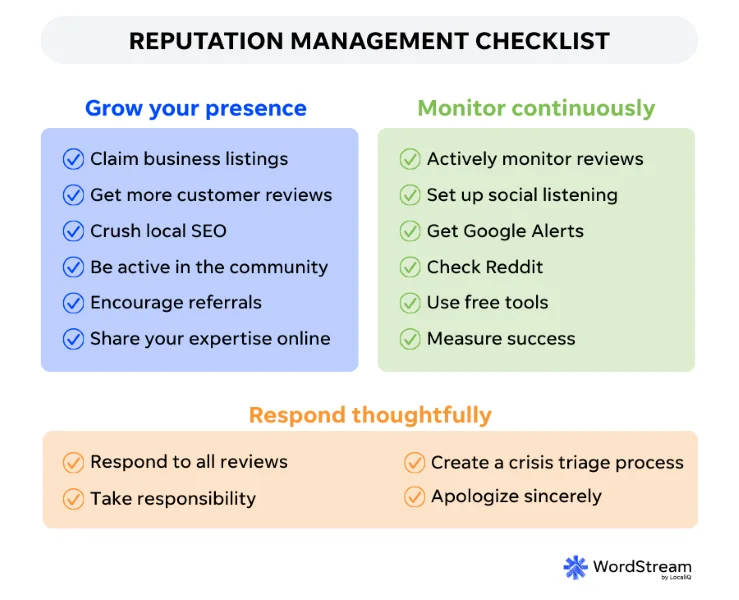
Keep in mind that reviews on your regular Google Business Profile appear on your LSAs, so the more positive reviews you have on your Google Business Profile, the nicer your PMax LSAs will look. This reputation management checklist can help ensure you have a well-rounded approach to advertising your services on Google Ads.
Use Google Local Services Ads today to book more jobs tomorrow
Google LSAs are quick and easy to create and manage, so incorporating this ad type into your marketing strategy is a win-win for your service business. Just be sure to carve out time to properly set them up and manage any leads your LSAs bring in.
To recap, here are the steps to get started with Google LSAs:
- Confirm your eligibility
- Create your business profile
- Add your license and insurance details
- Complete a background check
- Manage your leads