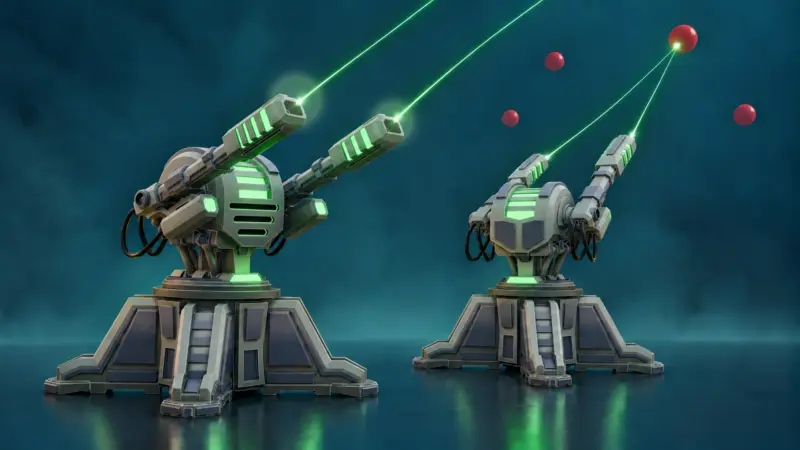
A new Blender 5.2 to Unreal Engine 5.8 course connects stylized hard-surface modelling, baked masks and Blueprint controls in one playable project.
Hi everyone, Neil here from 3D Tudor.
A sci-fi turret is one of those assets that can look completely finished in Blender and still be nowhere near ready for a game.
The model may have a strong silhouette, clean panels and a pair of convincing weapon arms. Then you import it into Unreal Engine, press a key, and the whole thing rotates around a point somewhere beneath the floor. The base moves when it should stay still, the barrels aim but the housing does not, and one muzzle seems determined to fire backwards.
That gap between “finished model” and “working asset” is the focus of Luke’s new course, Blender to Unreal Engine 5: Playable Stylized Turret.

The complete asset workflow
The course starts in Blender 5.2, where Luke builds the turret from the first blockout into a detailed stylized hard-surface asset.
You will create the mechanical foundation, stepped platform, central housing, twin weapon arms, support legs, panels, connectors and curved cables. The modelling uses practical tools such as bevels, Booleans, mirrors, arrays and curves while keeping the forms clean and readable.
More importantly, the turret is planned around how it needs to behave later.
The base remains fixed. The upper assembly rotates horizontally. The weapon group aims vertically. Those decisions influence the mesh separation, origins, UV layout and FBX hand-off before Unreal Engine is even opened.

From masks to material instances
Once the shared UV layout is prepared, the included Blender script generates ambient occlusion and edge masks.
The AO strengthens recessed and contact areas. The edge mask drives the stylized worn-edge treatment in the supplied Unreal Material Instances.
Inside Unreal Engine 5.8, you assign the prepared materials and replace their exposed texture parameters with the maps created for your turret. The final look combines light and dark metal regions, blue accent panels and green emissive details.

A Turret you can actually control
The imported components are assembled into a player-controlled Pawn.
A and D turn the upper turret. W and S raise and lower the weapons. Space fires one line trace from each muzzle.
The supplied target-range project provides the practice level, moving and respawning targets, score, countdown and HUD. Your job is to build the turret and its controls, then connect that work cleanly to the prepared challenge.
That distinction matters. The course is not pretending you build an entire game from scratch. It keeps the scope sensible and focuses on one complete asset with a playable result.

Course Resources
The downloads include eight turret reference renders, the Blender AO and edge-mask baking script, the Unreal target-range starter project, prepared materials and Material Instances, gameplay-support assets, and finished Blender 5.2 and Unreal Engine 5.8 reference projects.
The target range gives you a clear destination without doing the main work for you. You still create the turret model, UVs, masks, moving component structure, Material Instance assignments, Pawn hierarchy, aiming controls and dual-muzzle firing logic.
Launch Offer
For the launch, Blender to Unreal Engine 5: Playable Stylized Turret is available for $9.99 — 60% off with TURRETBLASTOFF.
The offer ends on 23 September 2026 at 18:00 EET.
And one bit of advice from me: do not buy it and let it sit in the library.
Open the first lesson, keep the project focused, and finish one asset that teaches you how modelling, pivots, UVs, masks, materials and controls all depend on one another.
Until next time, happy modelling, everyone.
Neil – 3D Tudor
![Your Sci-Fi Turret Looks Great. Until It Rotates from Under the Floor [$]](https://som2nynetwork.com/wp-content/uploads/thumbs_dir/Cover-124-1-rttpkk5oss8vxemyumc2ylpnixr9mr1glcy2bmnccc.jpg)
![Your Sci-Fi Turret Looks Great. Until It Rotates from Under the Floor [$]](https://som2nynetwork.com/wp-content/uploads/thumbs_dir/greatest-need-fund-featured-scaled-rttpr7uj7jd05yysyzxy4f8706xv5kh0ibavp6ry9o.png)