

Quick Summary: Oink or Viral Vue?

I’ve seen first hand that both Viral Vue and Oink for Influencers provide an ROI for serious influencers. They also have enough immediate value even smaller creators can justify the early expense. They will help you land more creator connection samples, boost your earnings and just flat out make your life as an influencer easier and more profitable. I use both and refuse to even consider dropping either. Viral Vue has a slight edge if your priority is product research and Oink has a slight edge if you’re more focused on creator connections and storefront management tasks. But for the most part, if you need to choose just one, it comes down to cost and preference since the majority of features overlap across both tools. We will break down all of that in detail in this article.
The Amazon influencer program is one of the coolest affiliate marketing opportunities that I’ve ever seen in my 12 years of full-time affiliate marketing. Most people (myself included) fail at most affiliate marketing methods. The influencer program however has one of the highest success rates I’ve ever seen. If you do the work, you will make money. A huge part of why that is is because of tools like Oink for Influencers and Viral Vue.
I mean this in all seriousness…
- I’m not sure I’d bother doing the influencer program if I didn’t have at least one of these tools. I had actually taken a hiatus from uploading for nearly a year and got back on the wagon after finding them.
- I can’t legally guarantee it, but if you don’t make your money back by using one of these, you’re doing something abnormally wrong (or just not publishing videos). Once you understand how the tools work and how they help you claim earnings you wouldn’t have without them, you’ll see what I mean.
But the thing about the two is they are extremely similar and most people don’t like paying for redundancy. Especially early on when a few subscription costs can easily eat up your actual profits.
Hence why you’re reading this article. You want to make a choice between one of the two. I’ve been asked which is better enough times now that I felt like going all in and writing a complete, unbiased comparison was well overdue.
So, let’s dive into it.
How These Tools Make You Money
Let’s talk really quickly about the general benefits of these two programs.
Finding Missed Commission Opportunities
I bought Oink originally solely for the “fetch orders” feature and it paid for itself within the first month. Viral Vue has since added the same functionality.
Aiding in Product Research
“Product research” in the influencer program is similar but different to product research in traditional physical product businesses. Oink and Viral Vue
Monitoring Your Storefront Health
Both tools help you see things like which videos are under-performing or are untagged. Acting on these insights can easily lead to a big boost in commissions.
Enhancing Creator Connection Outreach
Both tools focus heavily on creator connections. They help you connect with brands more easily and efficiently. They do this in various ways that we will dive deeper into shortly.
Speeding Up Admin Tasks
Both tools provide time saving features that help you create and optimize videos more effectively.
Providing Enhanced Analytics
Amazon’s performance reporting leaves a lot to be desired. These tools provide information like sales, placements and video performance in cleaner, easier to analyze ways.
Alright, let’s dive into the actual features.
Note: Both tools are constantly improving. It’s been a race to improve that has benefited the user base tremendously. If this article is more than a few weeks old, I bet there have been additions and improvements to each since I hit publish.
Feature Comparison: Overlapping Functionality
Here are the things that both the Oink and Viral Vue Chrome extensions do.
|
Header |
 |
 |
Header |
|---|---|---|---|
|
Creator Connection Outreach Templates |
Both let you create and send templated outreach (with smart placeholders) to brands. |
||
|
Originally just an Oink feature, now both can feth daily sales. |
|||
|
Creator Connections Cross Check |
Both let you see if you’ve sold items with creator connections campaigns and automatically accept the best available ones. |
||
|
Untagged videos do nothing for you. Both Oink and Viral Vue help you identify them and tag them quickly. |
|||
|
See your performance in a way that is much easier on the eyes than Amazon’s native dashboard. |
|||
|
Both can scan your Amazon orders to find opportunities. Viral Vue goes a bit further with the potential, but they both have the ability. |
|||
|
Sales Estimates (Daily Units and 30 Day Totals) |
Some tools require paid 3rd party integrations to do this. Both of these include it standard and built in. |
||
|
Both tools show you the number of competing influencers on each video and where their placement is. |
|||
|
Both tools allow you to track the brands and ASINs you’ve collaborated with. Viral Vue’s is a bit more robust but both are useful. |
|||
|
Bulk Submit Accepted Campaigns |
Both tools allow you to bulk accept campaigns. They do it differently but both make it possible. |
||
|
Video + Thumbnail Downloader |
Download your videos and thumbnails with a click of the mouse. Convenient for cross posting to other platforms. |
It’s clear why both tools can be considered “standalone” options. The functionality above is more than enough to make them worth it.
But fortunately for us, they each also have their own unique functions.
Feature Comparison: Key Differences
Alright, you didn’t open this article to hear about how they’re the same 🙂 Here are the differences.
Do you see now why I like to have both?
Where Viral Vue Wins: Product Research
Coming from the Amazon selling world, I love to be able to scan Amazon products at a glance. Viral Vue was created by an Amazon seller and you can tell.
Viral Vue overlays product insights on items on most Amazon search results pages (it doesn’t work on broad pages like movers and shakers or the home page).
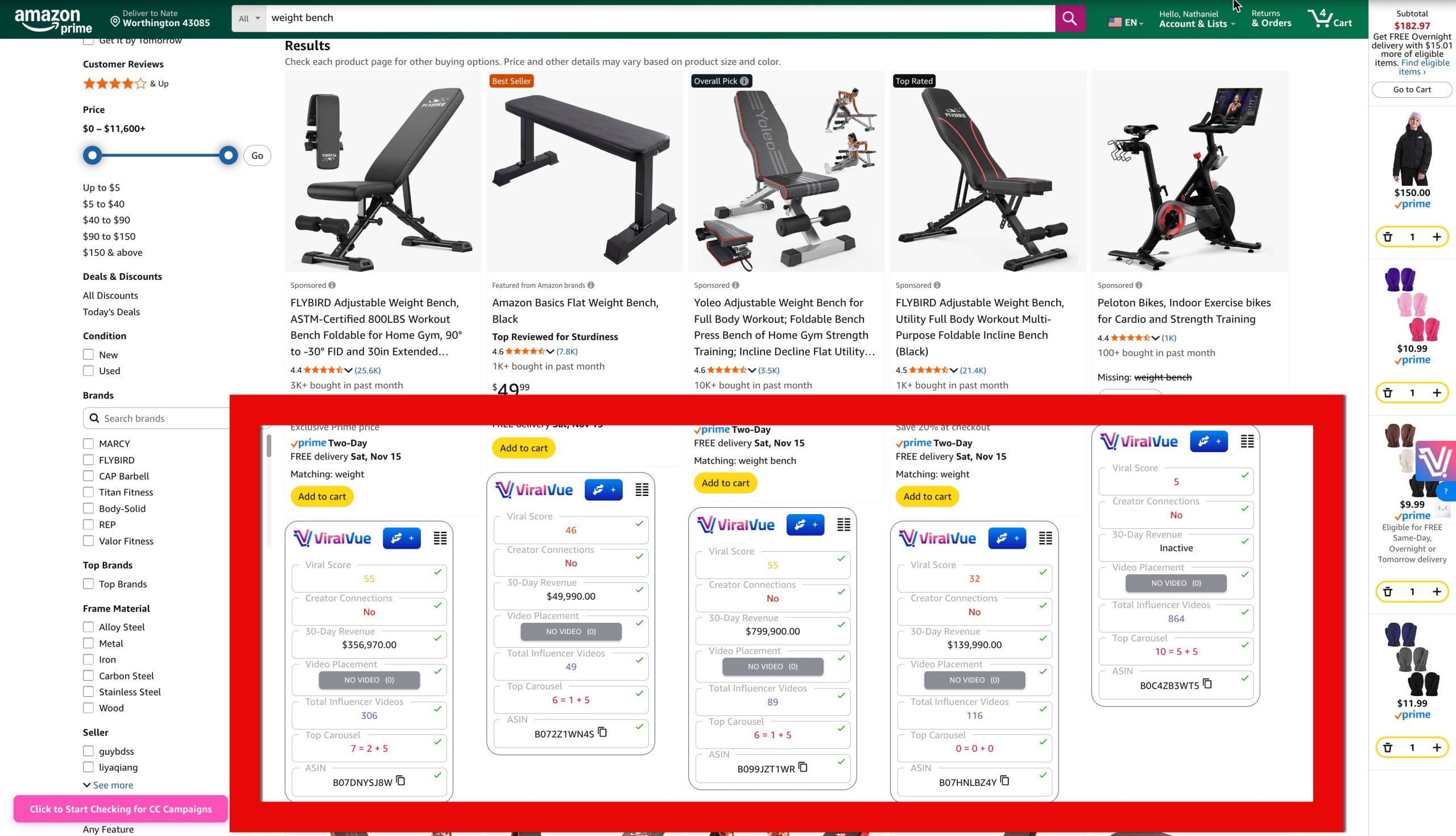
I can see products while scrolling but I can also click the extension and choose “Product View” and see all of the products in a sortable table, ranked in any order I want.
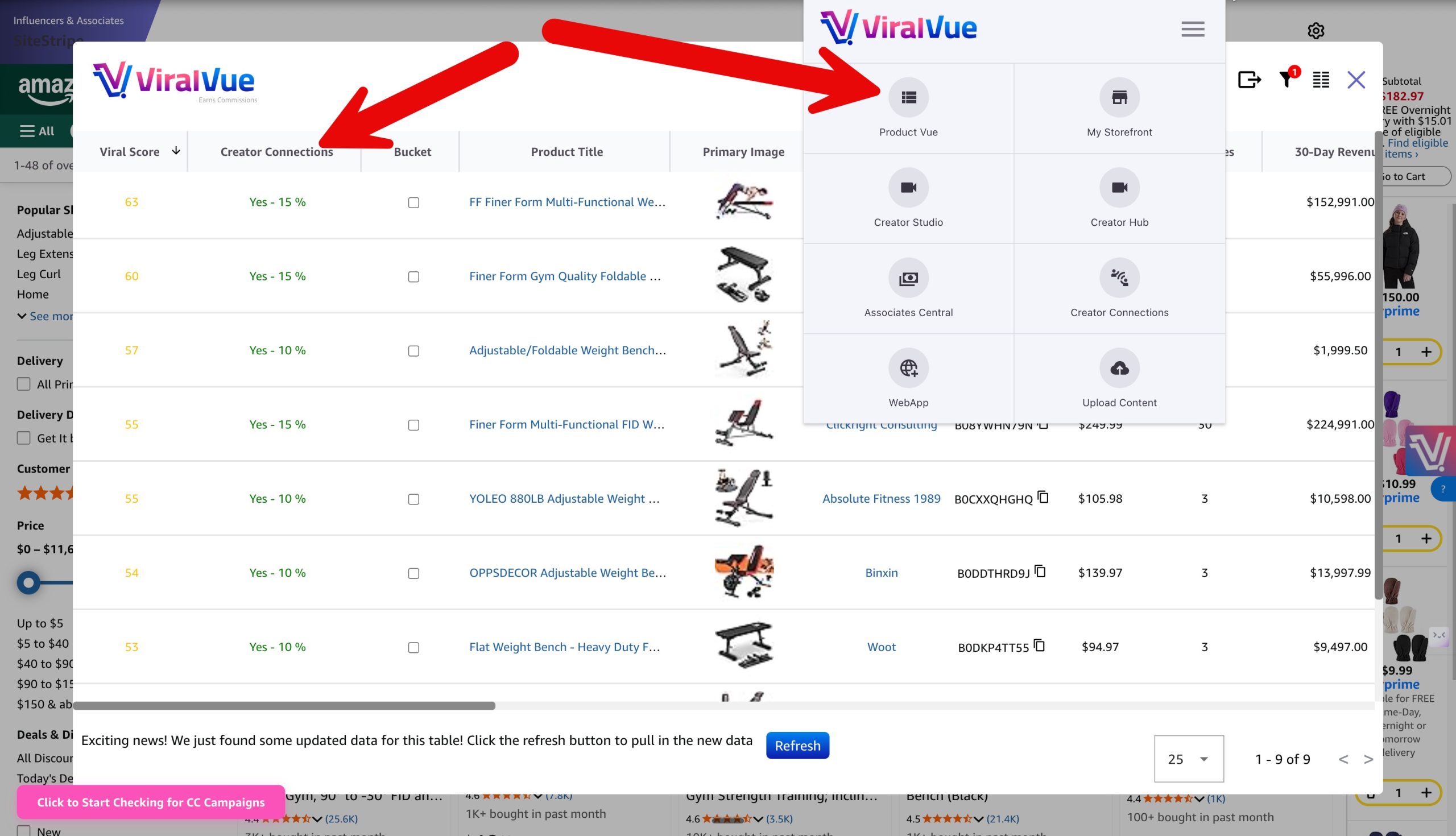
Viral Vue also brings the same product view functionality to the creator connections dashboard. You can filter creator connections to see which opportunities might be winners and you can bulk message them for samples (up to 20 per day on the pro plan).
Oink is also great for product research but they don’t provide the quick glance overlays or simple scoring system like Viral Vue does. It shines more once you’re on the actual product page. It shows two useful tools on each page.
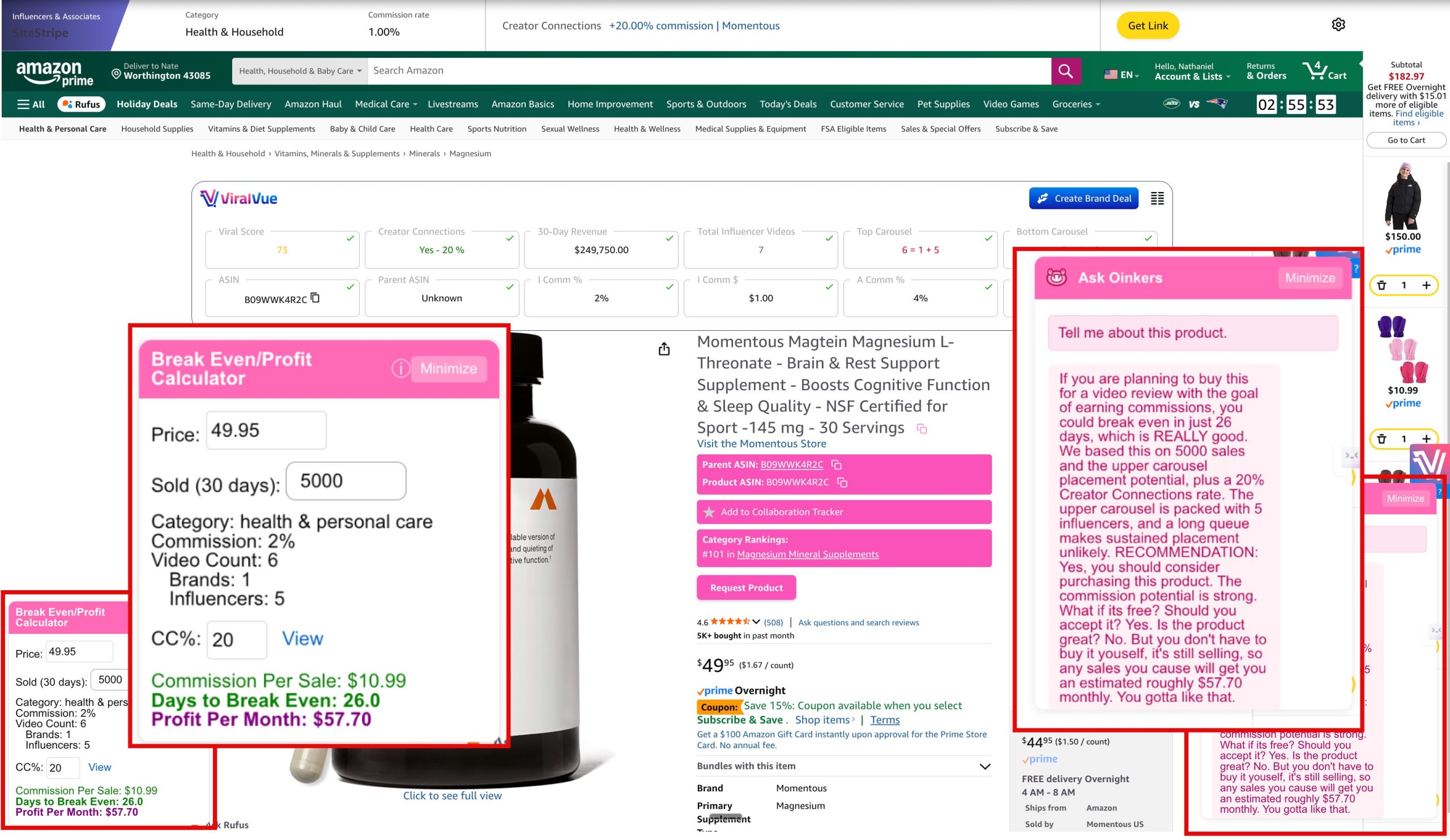
#1 Break Even Calculator – This is a neat way to see how long it will take to recoup the cost of the item. I don’t do a lot of “buy to review” but I do consider review potential when buying things I need anyway.
#2 Ask Oinkers – A chatbot that explains if a product is worth buying to review or not and why.
The tools compliment each other well. Viral Vue helps me quickly filter and identify potential winners and Oink gives me a more in depth, second opinion on the viability of the item. Combining these two makes my life much easier.
Where Oink for Influencers Wins: Swiss Army Knife Productivity
I think as an Oink user I take for granted how much easier it makes my daily workflow. Truly, I only leverage about half of the functionality.
Just little things like the title suggestion feature quietly help you make every video you publish better.
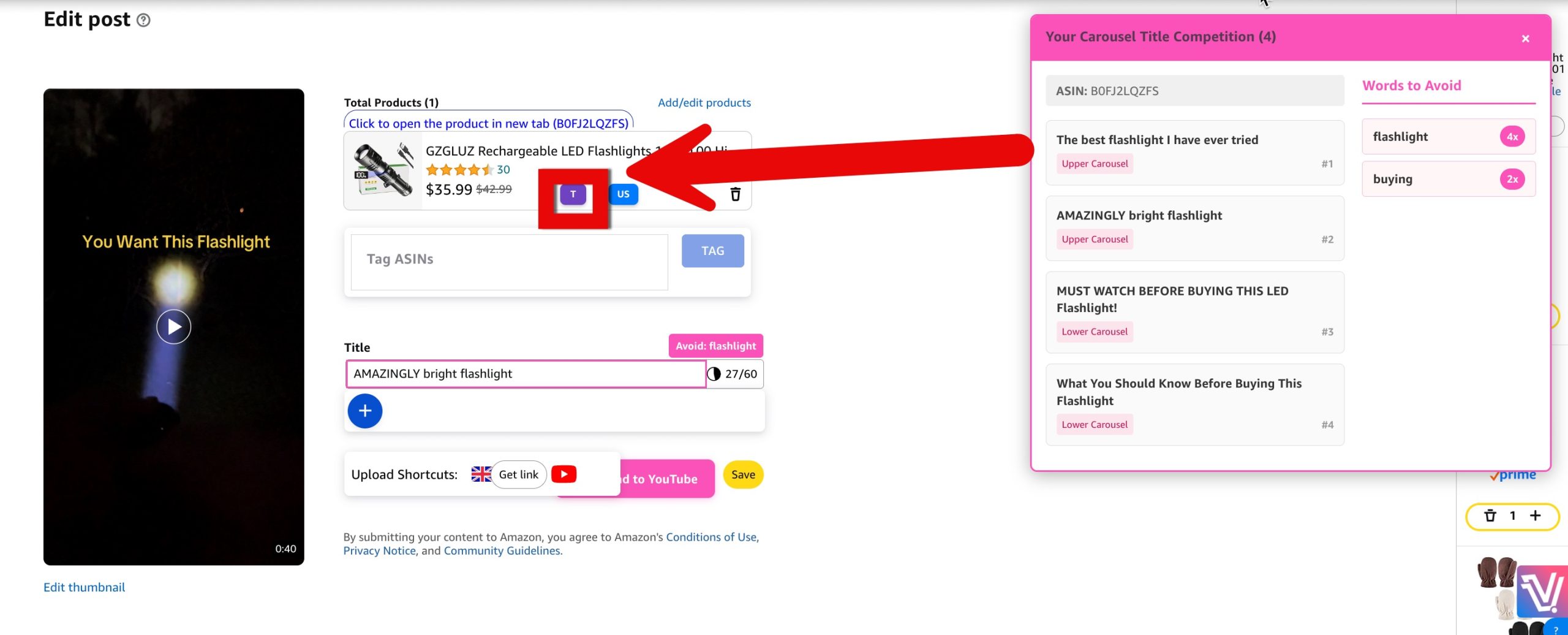
Oink is also a critical part of my creator connections outreach.
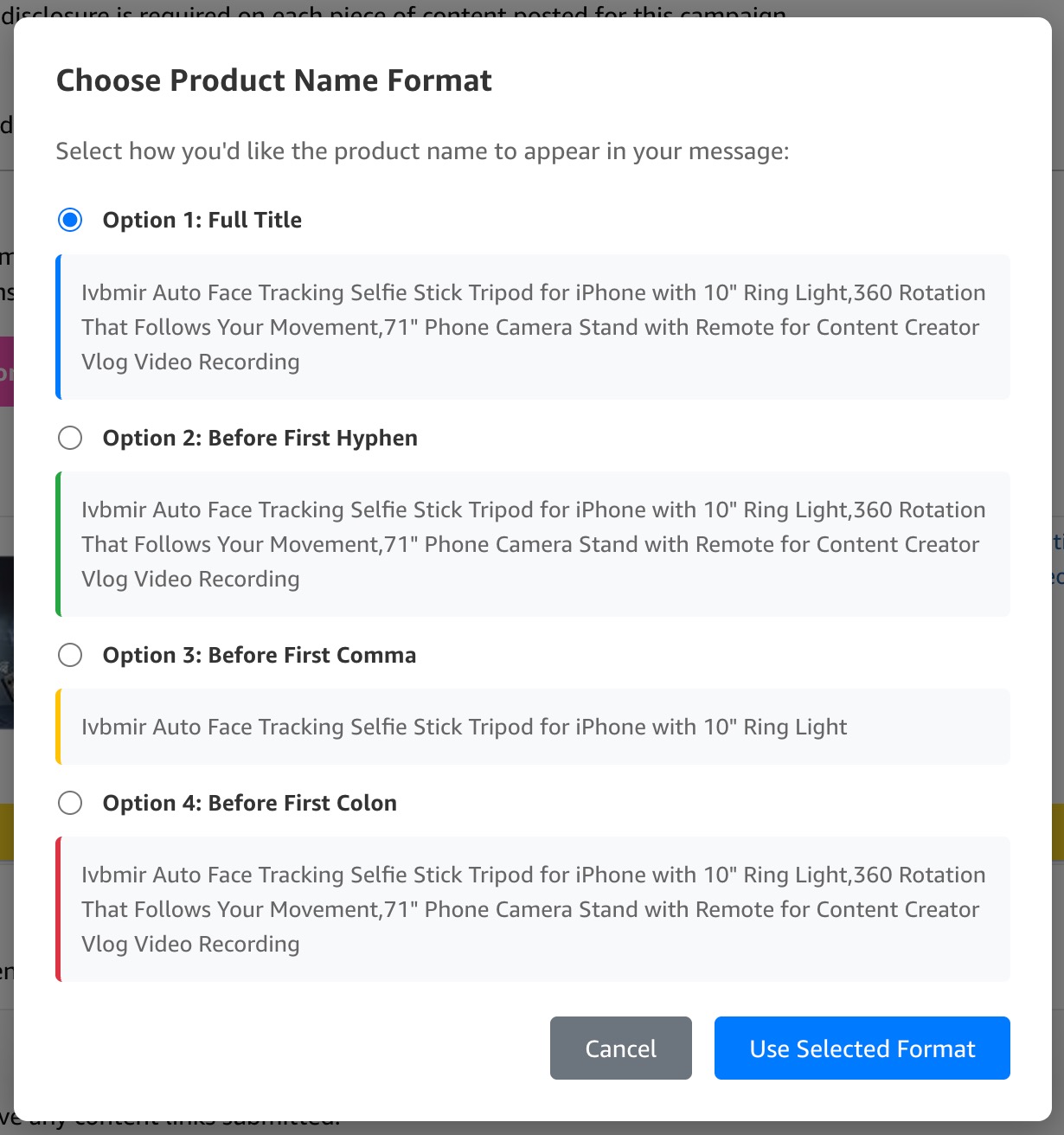
I use Viral Vue for bulk messaging, but use Oink for sending additional one off messages that are more granular. It offers a few neat options like the ability to choose how the product title inserts itself into your template messages.
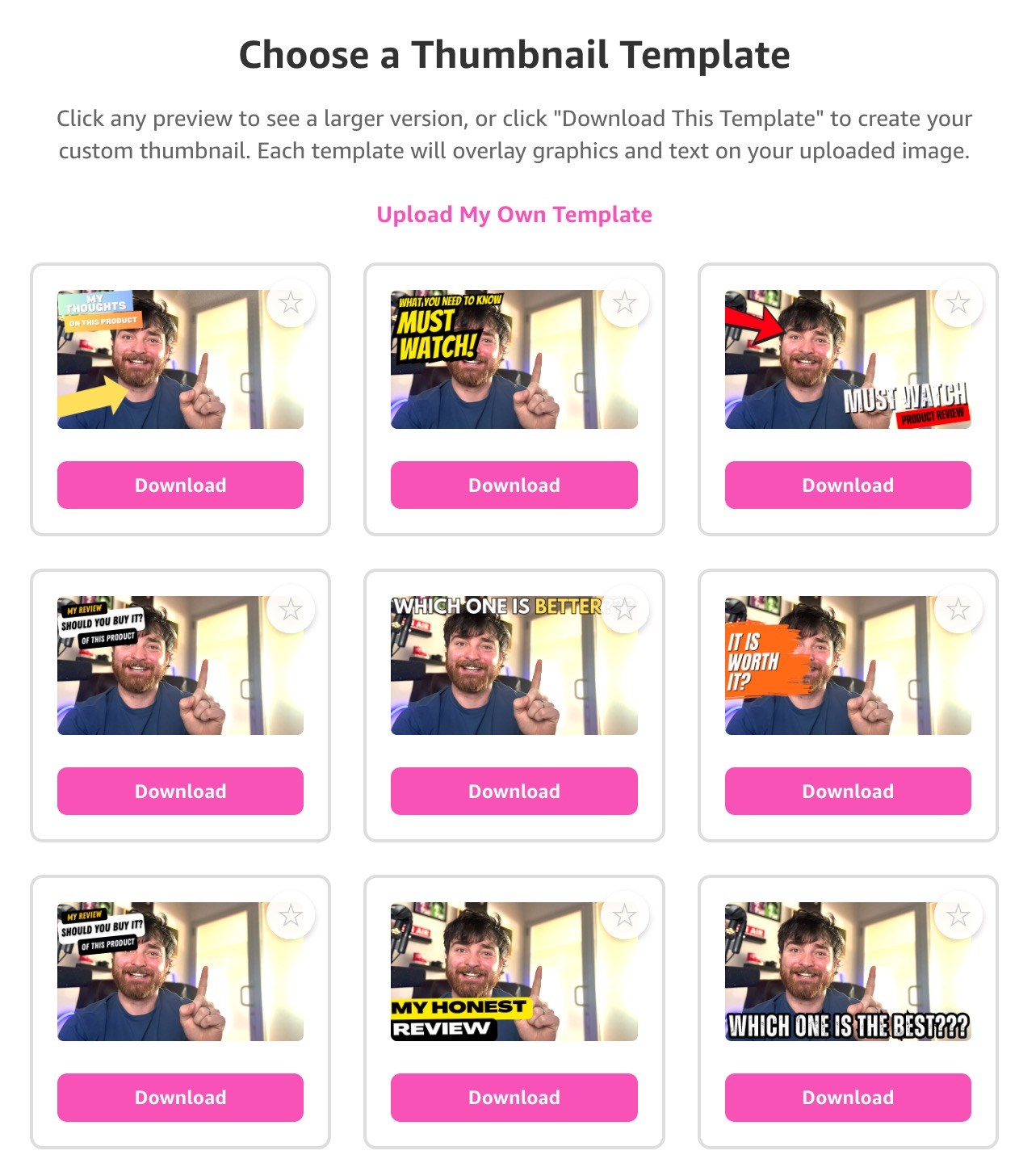
Oink now also helps you create thumbnails from within your Amazon dashboard.
Oink also makes it easy to cross post products to different marketplaces (currently Canada and the UK) as well as YouTube.
If you use the website for uploading, you will love this, but it obviously isn’t supported if you upload via the mobile app.
Oink lets me do bulk actions that would take hours to do on their own. AKA things that wouldn’t be worth my time and energy. Things like updating all titles at once for low performing videos and automatically create an idea list for unmatchable campaigns.
The fact that I can do all of this for such a low price is wild.
Let’s talk more about that now…
Oink vs. Viral Vue Pricing
Oink vs. Viral Vue Pricing
If you’re still on the fence and it’s a coin toss as to which you choose, Oink for Influencers is the more cost effective option. It costs $29.99/month or $199/year. It’s one of those rare softwares that actually gives you more than 20% off when you choose annual. Going with an annual plan saves you almost $160 per year compared to monthly.
Stack an annual plan with our 10% off Oink for Influencers coupon EAM.
Viral Vue is more expensive for the top tier plan which includes all functionality and 20 bulk creator connections messages per day but they do also have a middle range tier that costs $39/month or $390/year. That tier lacks the creator connections functionality though that makes it a complete alternative to Oink.
Just like Oink, you can lower the price of Viral Vue by 10% with coupon code EAM at checkout.
Both tools offer free plans, so you should at the very least give them each a test run.
Fortunately, both products are priced low enough that you can easily still stack profit margins on top of a subscription cost. These tools have a huge ROI if you know how to use them.
Examples of Oink and Viral Vue Complimenting Eachother
I know they can each handle most of the functions I do on their own, but I feel like they make the functionality better when used together.
On creator connections, for example, my messages have features galore when I have both extensions installed.

I have the quick response options, ASIN placeholder insertions and the deals manager with product images on the side. Having the image handy is wildly helpful when messaging brands at scale because it’s easy to forget which campaign is which.
Using both makes my product research process better.
Viral Vue is great for sorting and searching in bulk and then Oink is amazing once I narrow my search down to specific products. It’s like getting a second opinion on everything.
Viral Vue scans 100s of items at once and then the Break Even Calculator and Ask Oinkers features help me check beyond just the Viral Score.
Can you tell that I really want you to just scale so you can get both?
I think it’s a no brainer, but you have all the information now to decide if you agree!
Full Feature Breakdown (Per Websites)
Just in case I missed anything. Click on the toggles below to see the complete list of features as listed on each of their respective websites.
Creator Connections/Storefront Cross Check (Basic)
Creator Connections/Order History (Personal and Business Accounts) Cross Check (Basic)
Break Even/Profit Calculator
Untagged Video Check
Content Upload Quick Title
Storefront Quick Edit
Oink Earnings Tracker
Creator Connections High Opportunity Campaign Highlighting
Creator Auto-Add File Name to Video Title
Creator Connection Pro-Speed (70% Faster)
Creator Connection Brand Messaging
Creator Connections Brand Messaging Templates
Creator Connections Brand Block
My CC Campaign Products Report
Todays Sales Fetch and CC Cross Check
Canada/UK Product Check and Quick Upload
Canada/UK Storefront Fetches
Low Performing Videos Report
Video Upload Instant CC Campaign Check/Accept
Creator Connections Link Submitter
Storefront Content Download
Content Gap Product Opportunity Check
Creator Connections/Content Gap Cross Check
Collaboration Tracker
Storefront Over-Tagged Check
Storefront Unavailable Check
Oinkers Product Chatbot
Copyright Audit
YouTube Fast Track Upload
Instant Video Thumbnail Generator
Creator Connection Product Search and Bulk Brand Messaging on Amazon
CC Brand Auto Follow Up
Black Friday/Prime Day Content Cross Check
Parent ASIN EZ Tag
Piggy Planner Task Scheduler
Storefront Performance Analysis
CC New Brand Message Alerts on Amazon
Rejected Video Notifications
Oink Upload Suite (Instant CC Campaign Accept, Competition Title Analyzer, and CA/UK Availability Check)
Canada/UK Product Availability Check and Quick Upload
Deals Hub Deal Checker for CC Campaigns and High Opportunity Products
Access to Private Subscriber Only Strategy FB Group
Amazon Chrome Extension
-
Extension Overlay
-
Viral Score
-
Parent ASIN Tagger
-
Top / Bottom Carousel Data
-
Video Placement Data
-
Quick Title Templates
-
Storefront Scanner
-
Storefront Spy
-
Sales Estimates
-
Product Vue
-
Order History Scanner
-
Creator Connections
-
Total Influencer Video Count
-
Creator Connections Powered by AI
-
Find and Accept All Campaigns
-
Submit All Videos
-
Campaign Vue
-
Product Vue (duplicate in screenshot—kept once)
-
Brand Collab Automation
Amazon Storefront Optimizer
Amazon Web App
TikTok Web App
Note that some of those features are free and some are paid.
FAQs
1. “Which tool is more accurate?”
Neither tool is very valuable if it isn’t accurate. I find that Oink and Viral Vue are both highly accurate. Although they aren’t always perfect, they are plenty accurate to use as a baseline for product research.
The messaging functionality has yet to let me down either. I have not had any messages to brands go haywire or had any horror stories to speak of here.
2. “What about other alternatives like Fluencer Fruit?”
There are other good tools out there, but Oink and Viral Vue have earned the right to be considered in a heavyweight matchup.
3. “Are these sorts of tools compliant with Amazon’s terms of service?”
There is nothing in any of the documented rules and terms of service on Amazon that state that these tools violate the terms of service in any way. The only “risk” is that you might have your usage throttled if you have too many pages things working at once. This isn’t any sort of rule violation though, it’s just a tech hiccup that would solve itself (I’ve never had it happen by the way, but Amazon can throttle you if you run too many processes on their pages at once).
4. “What were those discount codes again?”
Aw! I’m glad you asked 😘 Code EAM takes 10% off either Viral Vue or Oink for Influencers. I am an affiliate for both tools which means I might earn a commission if you purchase via my links or use my code. It comes at no additional cost to you, and I really appreciate it when you do!
Which Will You Pick?
Honestly, the only way you can go wrong is if you get neither. I recommend testing out both with a month and see which you prefer. Just be sure to use EAM at checkout to save an extra 10% off of whichever you choose!


