A well-written quiz can still contain a wrong answer. That is the problem I keep in mind when considering AI chatbots for teachers. Useful classroom material has to survive a teacher’s review before it earns a place in a lesson.
My connection to this topic also includes ImagineLab Art, our in-house AI platform at Editorialge Media LLC. Its Imagine Chat feature is relevant to the preparation tasks discussed here. I expect our platform to face the same scrutiny as any chatbot used for teaching.
Teachers are already using AI in their work. A 2025 Gallup–Walton Family Foundation survey found that six in ten U.S. public-school teachers had used an AI tool during the 2024–25 school year. Common uses included lesson preparation, creating activities, and adapting materials. The survey covered AI tools broadly, rather than chatbots alone.
Reported teacher practices and professional guidance provide useful starting points. The 12 uses below include illustrative classroom examples, with a specific check attached to each task.
What Responsible AI Use Looks Like Before Class
Preparing resources with a chatbot and giving students direct access require different arrangements. Before either happens, four questions need attention:
- Approval: Does the school permit this tool for this particular task?
- Privacy: What information will be entered, and how will the service handle it?
- Student access: Do age requirements, required permissions, supervision, and safeguarding arrangements allow the proposed activity?
- Learning: Which skill will students practise, and what must they do independently?
Removing a name does not always protect a child’s identity. Personal writing, photographs, or details about family circumstances may still identify them. Use fictional examples or general descriptions when they can serve the task. Actual student material needs the school’s approved process.
Students also need clear rules about permitted assistance and acknowledging AI use. Provide an accessible alternative when an activity would otherwise exclude someone because of an account, device, payment, or accessibility requirement.
12 Responsible Uses of AI Chatbots for Teachers
A useful chatbot draft still needs a teacher’s judgment. Below, I explain 12 practical ways teachers can use AI chatbots for planning, practice, feedback, and reflection. Each example includes checks for accuracy, student privacy, and independent learning, so the support serves a clear teaching purpose.
1. Drafting Lessons Around a Clear Learning Objective
Lesson planning has some promising research behind it. An Education Endowment Foundation trial involving 259 teachers in 68 English secondary schools found that ChatGPT, used alongside a guide, reduced preparation time for the studied science lessons by 31%. That represented about 25 minutes per week for those tasks.
Reviewers found no apparent reduction in the quality of sampled resources. The trial did not establish improved student learning, so the finding should be understood as evidence about preparation time.
A useful request specifies the learning objective, prior knowledge, lesson length, and available equipment. The teacher can then assess the proposed sequence.
My priority here is whether the activities actually serve the objective. A polished plan may contain unrealistic timings or an enjoyable exercise that teaches very little. Those are decisions a teacher needs to make before using it.
2. Adapting Reading Materials Without Losing the Meaning
A student may understand a topic more readily than the language used to explain it. A chatbot can help draft simpler wording, shorter instructions, or supporting vocabulary.
For example, a teacher might adapt a science passage while retaining its essential terms and explanation. The original and revised versions should be reviewed together. Watch for missing qualifications, changed meanings, or important vocabulary that has disappeared.
Replacing “some” with “all” can turn an accurate statement into an inaccurate one. That kind of small change deserves attention even when the new passage sounds easier to read.
The learning objective should guide the adaptation. Where appropriate, the simpler passage can help students prepare to read the original. It should give them access to the concept while preserving what the lesson needs to teach.
3. Preparing Different Explanations and Worked Examples
A chatbot can suggest another way to explain a concept when the first explanation is not enough. In a fractions lesson, a teacher could request examples showing why one-half and two-quarters represent the same quantity. In a writing lesson, the task might involve showing how evidence strengthens a claim.
Check the steps as closely as the final answer. A correct result does not make an incorrect method suitable for teaching. For an analogy, identify which parts explain the concept accurately and where the comparison stops working.
Teachers can select an explanation based on the difficulties they have observed. The chatbot’s output offers possibilities; it does not establish why an individual learner is struggling.
4. Creating Questions for Low-Stakes Practice
Retrieval questions, comprehension exercises, and exit tickets are practical places to explore chatbot-assisted preparation. The teacher can review both the questions and the answer key before students see them.
ImagineLab Art’s Imagine Chat provides one possible tool for an illustrative workflow. A teacher evaluating it could work with a short passage they have written about evaporation:
- Provide the passage and the learning objective.
- Request five practice questions with an answer key based on that passage.
- Check that each answer is supported by the text and is factually correct.
- Revise ambiguous questions, remove duplicates, and adjust the challenge.
- Select the questions that reveal what students understand.
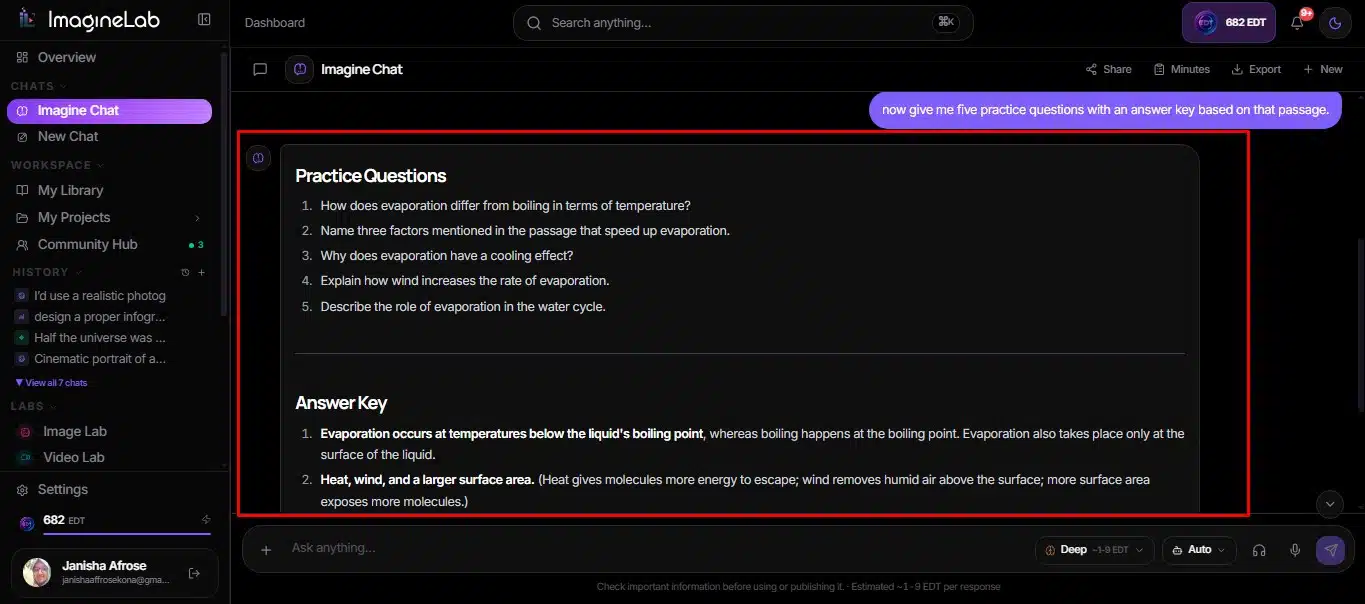
This is a proposed example, rather than a report of a classroom test.
My standard for the finished questions is straightforward: they should reveal understanding, not simply reward copying a sentence. Student responses can then help the teacher decide what needs explaining again.
5. Giving Students a Useful Starting Point
Sentence starters, planning checklists, and prompts for organising evidence can help students begin an assignment.
For an argument-writing task, a teacher might prepare a scaffold with openings such as “My claim is…” and “This evidence matters because…”. Students still choose their position, select evidence, and explain their reasoning.
The important check is how much thinking the scaffold leaves for the learner. If the assignment assesses argument construction, a complete AI-written argument removes work the student was meant to practise.
I value support that makes the next step manageable. The teacher should also decide when to reduce that support so students have opportunities to work independently.
6. Drafting Rubrics and Formative Feedback
A chatbot can help turn learning goals into draft assessment criteria. It can also suggest clearer wording for feedback intended to help a student improve work in progress.
A fictional sample response allows teachers to explore this without sharing a student’s submission. The draft rubric should describe meaningful differences in performance and match what the assignment actually asks students to do.
For feedback, every comment needs support in the work being reviewed. A confident observation about an idea the student never expressed is a reason to revise the comment.
Educators should retain responsibility for final assessment decisions. Actual student submissions require an approved data-handling process, and high-stakes assessments need particular care under the relevant rules.
7. Preparing Multilingual Instructions and Glossaries
Ofsted’s research into early AI adopters described college staff translating and adapting materials for students who spoke English as an additional language. One reported example included an Arabic glossary of key terms.
This is a useful preparation task: draft bilingual vocabulary or routine instructions, then arrange appropriate review.
A translation check should cover:
- Meaning: Does the translated version preserve the instruction?
- Terminology: Are subject-specific words accurate?
- Tone: Is the wording suitable for the learners?
- Completeness: Have any conditions or important details been omitted?
A competent speaker should review the output. Important or sensitive communications need the appropriate human translation or interpretation process. The purpose is to help learners access the material. That depends on the accuracy of the language they receive.
8. Preparing Discussion and Role-Play Activities
British Council resources describe chatbot uses such as role-play and debate practice. Teachers can also prepare dialogue, discussion questions, or possible viewpoints before a lesson.
A language teacher might draft a conversation between a customer and a shop assistant, then adjust the vocabulary and sentence structures. Students can perform the dialogue with each other, without needing individual chatbot access.
Review the scenario for stereotypes, unsuitable content, and language that fits the lesson. For debate, check whether the suggested positions fairly represent the issue and whether factual claims have support.
Invented dialogue must remain clearly labelled. A chatbot speaking as a historical figure does not provide authentic quotations or evidence of that person’s views.
9. Offering Supervised Hints During Practice
Hints can help students move forward while leaving the problem for them to solve. Their usefulness depends on how the system responds and how the activity is supervised.
A high-school mathematics experiment in Turkey found that unrestricted GPT-4 assistance improved practice performance but harmed later performance when assistance was removed. A tutor designed around teacher-provided hints largely mitigated that negative effect. These findings came from a specific setting and do not establish how every chatbot will perform.
For direct student use, evaluate an approved system against the intended teaching approach. Test what happens when a learner requests the complete answer. A “give hints only” instruction is not a guarantee.
Students should then explain the method or attempt a related question without AI. Their independent work gives the teacher evidence of what they learned.
10. Teaching Students to Check AI Answers
An AI answer can become material for a lesson in verification. Students can compare an explanation with a textbook passage, investigate a reference, or identify a claim that lacks evidence.
The teacher can prepare and review the outputs beforehand. Students can then work from a shared display or printed material.
The task should require more than deciding whether the answer sounds convincing. Students need to establish whether the source exists, whether it supports the claim, and whether important context is missing. Asking the same chatbot to confirm its own answer does not provide an independent check.
I consider the explanation of that checking process valuable. It shows how students reach a judgment, including what they do when the evidence is incomplete.
11. Drafting Routine Messages to Families
General trip reminders, meeting invitations, and explanations of classroom activities are another possible preparation task. A chatbot can help organise the information into a readable draft.
The Department for Education gives an example of drafting a parent email without entering personal data into the AI tool. Identifying details are added afterward.
Teachers can use placeholders and general information, then complete the message through the school’s approved communication process. Check every date, cost, deadline, instruction, and contact detail before sending.
The wording also needs to reflect the school’s actual arrangements. Remove promises or policies the chatbot has introduced without support. Sensitive conversations require the teacher’s direct attention and knowledge of the family’s circumstances.
12. Reflecting on Lessons and Planning Adjustments
British Council guidance includes AI-supported teacher reflection. A chatbot can suggest questions to consider after a lesson or possible changes to an activity.
A teacher could describe, in general terms, that a group task took too long. Suggestions might help them review the instructions, the amount of work, or the way students were grouped.
The chatbot did not observe the class. It cannot establish why learners lost focus or why the task was difficult. That requires the teacher’s observations, students’ work, and sometimes discussion with colleagues.
The useful outcome is a manageable next step. Select one adjustment, try it, and review what students were able to do afterward. A plausible suggestion becomes valuable when there is evidence that it helped.
Start With One Task, Then Check the Learning
My advice is to begin with one approved preparation task: a set of practice questions, a lesson outline, or a draft glossary. Count the time spent reviewing and correcting the output when deciding whether the workflow helps.
After the lesson, use a brief independent task to check understanding. Ask students to explain the concept, apply the method, or justify a choice. Their responses can reveal whether the material did the job it was meant to do.
For Imagine Chat and other chatbots, that is the standard I care about. A useful draft should earn its place through careful review and a clear contribution to the lesson.
Frequently Asked Questions on AI Chatbots for Teachers
1. Can Primary-School Children Use AI Chatbots?
It depends on the tool and the setting. Schools need to check age requirements, applicable rules, required permissions, and safeguarding arrangements before direct student access. A teacher-controlled demonstration is a different activity and also needs appropriate approval. Younger children can learn about AI through teacher-prepared examples without opening chatbot accounts.
2. Can Teachers Use AI to Grade Student Work?
AI may assist with draft rubrics and formative feedback where school policy permits. Educators should retain responsibility for assessment decisions and verify that comments reflect the work. Sharing actual submissions also raises privacy and rights issues. High-stakes assessment must follow the relevant qualification, institutional, and local requirements.
3. What Student Information Should Stay Out of Chatbot Prompts?
Keep identifiable or sensitive information out of services that have not been approved to handle it. This includes names, contact details, student IDs, photographs, health information, and identifiable personal writing. Removing a name may leave other identifying details. Fictional examples or general descriptions are often sufficient for preparation tasks.
4. How Can Teachers Keep Students Thinking Independently?
Identify the skill students need to practise, then design assistance that leaves that work with them. Ask learners to explain choices, show their process, or complete a related task without AI. Assignment instructions should clearly state which assistance is permitted and how students should acknowledge it.
5. Do AI Chatbots Improve Learning Outcomes?
Results vary with the system, learners, task, and teaching design. Some studies of AI supporting human tutors have reported benefits; research on unrestricted student assistance has also identified problems. Faster resource preparation does not demonstrate better learning. Look for evidence relevant to the specific outcome and use being considered.