Educational events carry registration requirements that generic event registration software rarely handles well. If you plan events for a university, an academic society, a school district, or a certification body, this guide covers the challenges you face, what to look for in a platform, and the questions to ask before you commit.
Your events range widely. A continuing education department runs professional development workshops, an academic society organizes an annual research conference, a school district manages a leadership summit, and a certification body runs multi-day training programs. Demand for this kind of learning keeps climbing, and institutions are increasingly prioritizing workforce-aligned education, corporate training, and employer partnerships, according to UPCEA’s State of Continuing Education 2025 report. Each of these events reflects the complexity of the educational context, and your registration process has to reflect it too.
The Unique Registration Challenges Educational Organizations Face

Educational event management combines audience diversity, credit tracking, and content-heavy programs in ways that stretch basic tools. The sections below break down the challenges you are most likely to run into.
Multiple Attendee Categories With Different Pricing and Access
Educational events typically involve several distinct attendee groups, each with different pricing, data requirements, and access to sessions or event areas:
- Students
- Faculty and staff
- Alumni
- Industry guests
- Members and non-members of an affiliated professional association
Managing all of them in a single registration form requires flexible ticket types and conditional form logic. Without those tools, you face a bloated form that shows everyone everything, or the overhead of maintaining separate registration processes for each audience.
Continuing Education and Professional Development Credits
Many educational events offer continuing education units (CEUs), professional development units (PDUs), or other credits. These require you to track registration data at the session level. Attendees need to indicate the sessions they will claim credit for, and you need structured data that feeds into post-event certification and reporting.
Registration forms that support session preferences and custom fields for credential or employer information are a practical requirement for any event with a professional development component.
Abstract Submission and Speaker Management
Academic conferences often run parallel registration workflows: one for general attendees, and one for presenting authors and speakers. These groups have different needs, deadlines, and pricing. Managing both within the same platform, with appropriate access controls and form logic for each, reduces the complexity of running multiple systems side by side.
Student and Faculty Registration at Different Price Points
Institutions running external-facing events often offer discounted or complimentary registration for students and faculty, and those rates are not always meant to be public. Access codes that reveal hidden ticket tiers, or RSVP-gated flows for institutional members, are the standard way to handle this without cluttering your public pricing.
Multi-Track, Content-Heavy Events
Academic and professional development conferences often have dense agendas: multiple concurrent tracks, breakout sessions, workshops, and keynotes across several days. Your event website needs to present this content clearly, with dedicated agenda and speaker pages, so attendees can evaluate the program before they register. A website builder that supports multi-page sites is important when the program itself drives the registration decision.
International and Multilingual Audiences
Academic and research conferences often attract international attendees, so language accessibility matters for both the event website and the registration support experience. An artificial intelligence (AI) registration concierge that detects a visitor’s language and responds in kind is a practical tool for events with significant international attendance, and it works without a fully translated event website. Mission-driven groups face the same reach challenge, which is why nonprofit and education-adjacent organizations run comparable event programs built on flexible registration.
Why do educational events need specialized registration software?
Educational events combine multiple attendee types, credit tracking, abstract submission, and content-heavy agendas that generic tools handle poorly. Specialized software captures session-level data, gates hidden pricing tiers, and adapts a single form to every audience in one place.
What to Look for in Education Event Registration Software
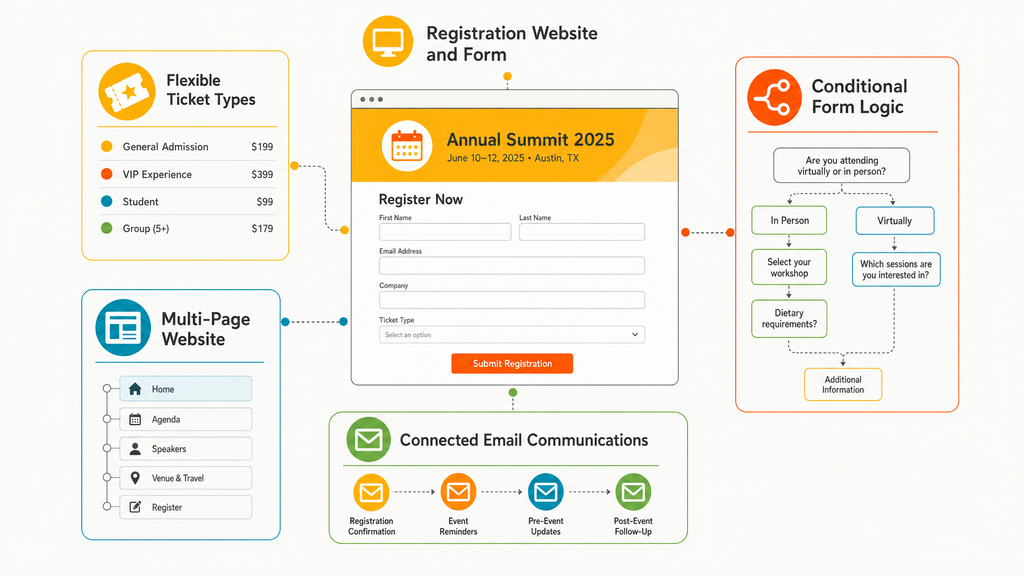
Strong education event registration software should handle multiple attendee types, hidden pricing tiers, and session-level continuing education tracking. It should also offer conditional form logic, a multi-page website builder, RSVP gating, integrated email, and multi-language support. Here is how EventMobi’s event registration software approaches each capability that maps to the challenges above.
Flexible Ticket Types and Hidden Pricing Tiers
Look for a platform that supports multiple ticket types within a single event, each with its own pricing, availability, and access conditions:
- General admission
- Student and faculty
- Member
- Early bird
- Speaker
- Complimentary
Access Codes that reveal hidden ticket tiers are the standard mechanism for student and faculty pricing you do not want to advertise publicly.
Conditional Form Logic for Multiple Attendee Types
You want a form builder with if/then logic that shows or hides fields based on ticket type or prior selections. Students should not see faculty-specific fields, and presenters should see abstract or session fields that general attendees do not. EventMobi’s Form Conditions handle this within a single form, which is the practical alternative to building a separate form for each audience.
Session Selection and CE Tracking Support
You will want custom form fields for session preferences, credential numbers, and professional development tracking. Where session selection is a firm registration requirement rather than a preference, confirm how the platform handles it. Native session selection during registration is an advanced capability, and many platforms, EventMobi included, address it today through ticket types that represent session tracks or through form fields that capture preferences.
Multi-Page Event Website Builder
A drag-and-drop website builder should support multi-page sites with dedicated agenda, speaker, sponsor, and registration pages. Academic conference attendees study the program in detail before committing, so a content-rich, well-organized site is a direct driver of registration conversion. EventMobi’s Website Builder supports multi-page event sites with sticky navigation and unique page URLs.
RSVP and Invitation Management
For institutional events, invitation-only workshops, and events where pre-approval is part of the process, you need private registration gating and RSVP flows. Confirm that these live in the same platform as your public-facing events so you are not stitching tools together.
Integrated Email Communications
Segmented email campaigns let you send different messages to non-registrants, incomplete registrants, and confirmed attendees. For academic events with long lead times and multiple early bird deadlines, EventMobi’s Communications Hub reads directly from registration data, which reduces the manual work of managing complex email sequences.
Multi-Language Support
For events with international attendees, an AI registration concierge that detects and responds in a visitor’s language provides a more accessible experience. EventMobi’s MobiAI Reg Concierge offers multi-language support on the registration website, so international visitors can get answers without a fully translated site.
Connected Event App and Onsite Tools
For multi-day conferences, registration data should flow automatically into the event app, badge printing, and onsite check-in. A single system eliminates the data reconciliation step, which is especially error-prone for large academic conferences with complex session structures.
How do you serve different attendee types with one registration form?
Conditional form logic shows or hides fields based on ticket type or prior selections, so one form adapts to each audience. Access Codes reveal hidden student, faculty, or speaker tickets without advertising those prices publicly.
Common Education Event Registration Workflows
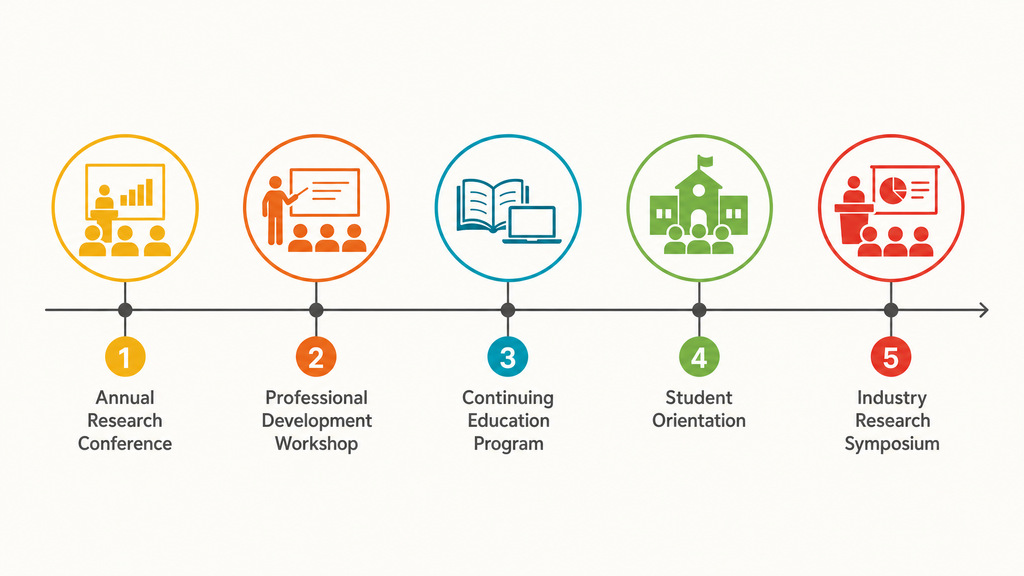
Educational events tend to fall into a handful of recurring patterns. Matching your event to one of these makes it easier to scope your requirements.
Annual Academic or Research Conference
The flagship event for an academic society or university department, and usually the most complex. It involves multiple attendee types, abstract submission and speaker registration, early bird pricing, session track selections, and a content-rich multi-page website. It often draws international attendees, which is exactly where robust conference registration software earns its keep.
Professional Development Workshop or Certificate Program
Moderate complexity, with credential tracking for CEU or PDU credits. Expect session or module selection during registration, custom fields for employer and credential information, and structured data export for post-event certification.
University Continuing Education Program
Multi-session programs with enrollment caps per session, pricing that varies by course or module, and a mix of student, alumni, and community registrants. These require flexible ticket types and careful session availability management.
Student-Facing Event or Orientation
Simpler registration with student-only access gating, free or low-cost tickets, and communications focused on logistics. The key requirement is restricting access to current students without building a separate registration process.
Industry-Facing Research Symposium
An event that bridges academic and industry audiences, with separate registration tracks and pricing for university affiliates and external guests. Managing the boundary between the two audiences within a single registration system is the main challenge here.
Which educational event is the hardest to manage in registration?
The annual academic or research conference is usually the most complex. It combines multiple attendee types, abstract and speaker registration, early bird pricing, session track selections, and a content-rich multi-page website.
Questions to Ask When Evaluating Platforms
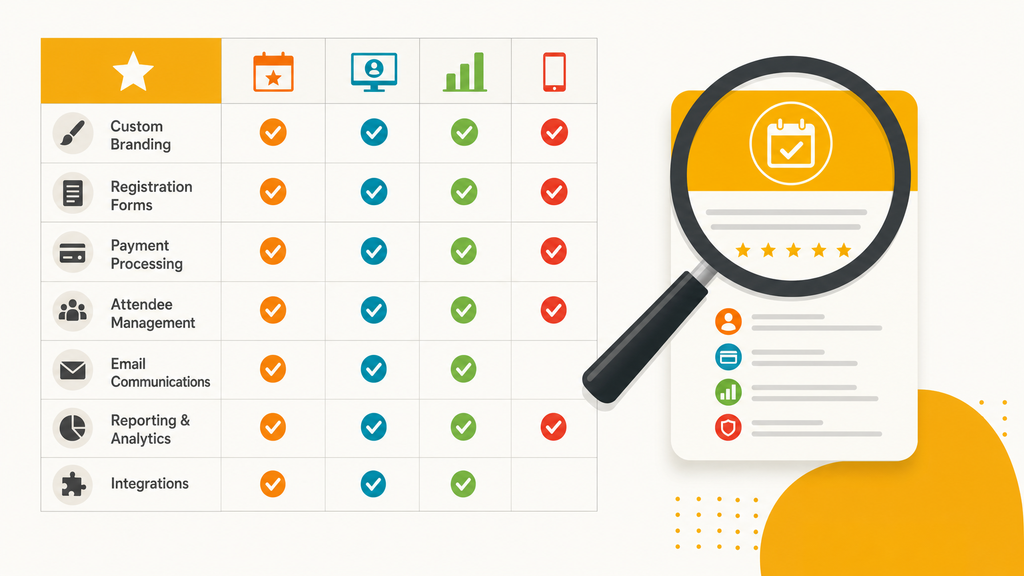
The most important questions cover session selection, conditional form logic, abstract and speaker registration, continuing education data export, and multi-event subscription pricing. Ask vendors to prove each one against a real scenario from your own events. For a deeper checklist, see how associations evaluate event registration platforms, since their needs closely mirror academic organizations.
- Does the platform support session selection during registration? This is common for academic conferences with CE tracking, and it is an advanced capability. Confirm whether it is native or handled through ticket types or form fields.
- Can the form show different fields to students, faculty, and external attendees without separate forms? Conditional form logic is the practical requirement. Ask for a live demonstration with a multi-audience scenario.
- Does the platform support abstract submission and speaker registration alongside general attendee registration? Some platforms handle this in one system, and others require separate tools. Confirm your preferred approach is supported.
- How does registration data export for CE and PDU reporting? Most platforms do not offer native CE management. Confirm the export formats and whether they fit your accreditation or human resources system.
- Does the platform support multiple events under a single subscription? For institutions running many events across departments, subscription pricing that covers all events is far more cost-effective than per-event fees.
Frequently Asked Questions
The Bottom Line
Educational event registration is content-rich, audience-diverse, and often tied to professional development outcomes that require structured data from the start. The platforms that serve this sector best support flexible attendee types, conditional form logic, multi-page event websites, and clean data export for post-event reporting.
If you are evaluating options, prioritize form flexibility, session handling, and how registration data flows into the downstream tools you use to run and report on your event. Get those three right, and educational event management becomes far less of a manual grind.
See how EventMobi’s event registration software works for education events, or book a demo to walk through a multi-audience scenario with your own requirements.