

Multiple Methods to Open OST File
Method 1: Open the OST File with an OST Viewer
eSoftTools OST Viewer Software is one of the best options for your OST file if you only need to open and read your emails, contacts, calendars, or attachments from OST file without installing Outlook.
The OST Viewer tool specially scans OST files of all sizes within seconds and displays their stored content. You can preview all the folders and sub-folders, search for any specific email, and view attachments without changing the original file.
The eSoftTools OST Viewer Tool is most helpful if-
- If Outlook is not installed on the computer
- Connection issues between Exchange Server and Outlook.
- Accidental account deletion from Exchange or Office 365.
- You found an old OST file and want to check what’s inside.
OST Viewer software is sufficient and fulfils user requirements if they only want to read or view emails from OST file. However, if you need to import or convert OST emails to another email-compatible file like PST, EML, EMLX, MSG, HTML, MHTML, MBOX, Thunderbird, Office365, Google Workspace, Yahoo Mail, or any IMAP Account, then you must go with converting OST file as mentioned in Method 2.
Method 2: Convert the OST File to PST
Converting OST file is necessary when Outlook cannot access it. MS Outlook uses PST as its standard file format, allowing users to open and access mailbox data easily in Outlook. So OST to PST file conversion is one of the best choices for users. eSoftTools OST to PST Converter is the most recommended and suitable tool for users to opt for and easily convert OST to PST files.
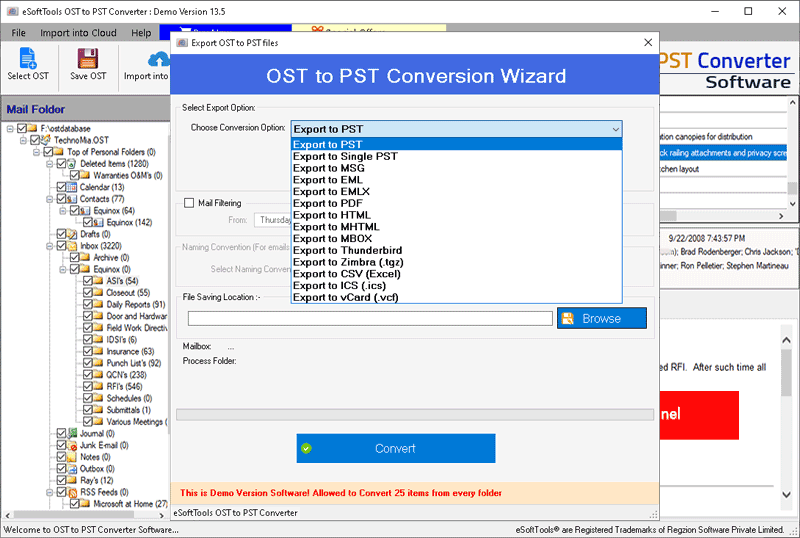
This software not only converts OST files to PST but also converts in 14+ other file formats such as OST to PST, EML, MSG, EMLX, HTML, MHTML, MBOX, Thunderbird, PDF, Office 365, Gmail, Google Workspace, Yahoo Mail, and IMAP accounts.
While converting OST files, this software can easily maintain-
- Emails
- Email Attachments
- Email Metadata
- Contacts
- Calendars
- Notes
- Tasks
- Journals
- Folder Hierarchy
Method 3: Try to Reconnect Original Email Account
This method works if your Exchange Server or Microsoft 365 account is still active. Firstly, check if your mail server accounts are active and working fine, then reconnect the original account and check if the OST file automatically syncs.
However, this method cannot access data from an orphaned OST file.
Method 4: Restore Old or Create a New Outlook Profile
Sometimes an Outlook profile can be the reason for OST file inaccessibility. So creating a new Outlook profile or restoring the original profile through the Mail option setting may allow Outlook to connect with your existing OST file.
If MS Outlook syncs your existing OST file, it will display all your mail folders and emails. At this stage, converting it to a PST file is a recommended option for future use.
Note: This solution works only when the mailbox still exists and is accessible on the Exchange or Microsoft 365 server.
Method 5: Import the Data into Outlook
Importing data into Outlook is such a great option, but it will require converting the OST mailbox into PST file. Once you have the PST file, follow the options below to import into Outlook.
- Open Microsoft Outlook
- Go to File menu
- Select Open & Export option
- Click Open Outlook Data File
- Browse and select the converted PST file
After taking these steps, Outlook import the file and display in Outlook environment.
Method 6: Use Microsoft Outlook’s Auto Archive or Backup (If Available)
If you have enabled the auto-archive feature in Outlook, then it’s good to get the archived file. So, first check if you have enabled this feature or not by going to this path-
File → Options → Advanced → Auto Archive Settings
When you enable this option, Outlook creates an Archive.pst file that allows you to import and access your OST mail items in Outlook.
Note: This method works best if a recent PST backup is available; otherwise, the archived file may contain older emails.
Method 7: Recover Data from an Orphan OST File Using Professional Software
Using professional software for OST file recovery and conversion is always the best choice if none of the manual methods works. eSoftTools OST to PST Converter handles such situations by allowing users to open OST files without Outlook and process OST files of any size.
The software quickly scans and extracts every single email message, mail folders, calendars, contacts, tasks, notes, journals, and attachments. Check the email previews within the software to verify how securely they recover OST file and opens it without data loss.
There are 14+ different conversion options available where users can easily export OST file without requiring any additional software application. The software requires just 3-easy steps to open and view OST files-
- Open the software
- Add OST file and scan it
- Preview all the emails and other items from their respective folders.
Available Conversion Formats- OST to PST, EML, EMLX, MHTML, MSG, HTML, PDF, Thunderbird, MBOX, PDF, vCard, ICS, Google Workspace, IMAP accounts, Office365, and Yahoo Mail accounts.
Software Screenshot


