Character Creator Digital Double: How PhiBix Sculpted a Photoreal Michael Jackson Without Leaving the Reallusion Pipeline

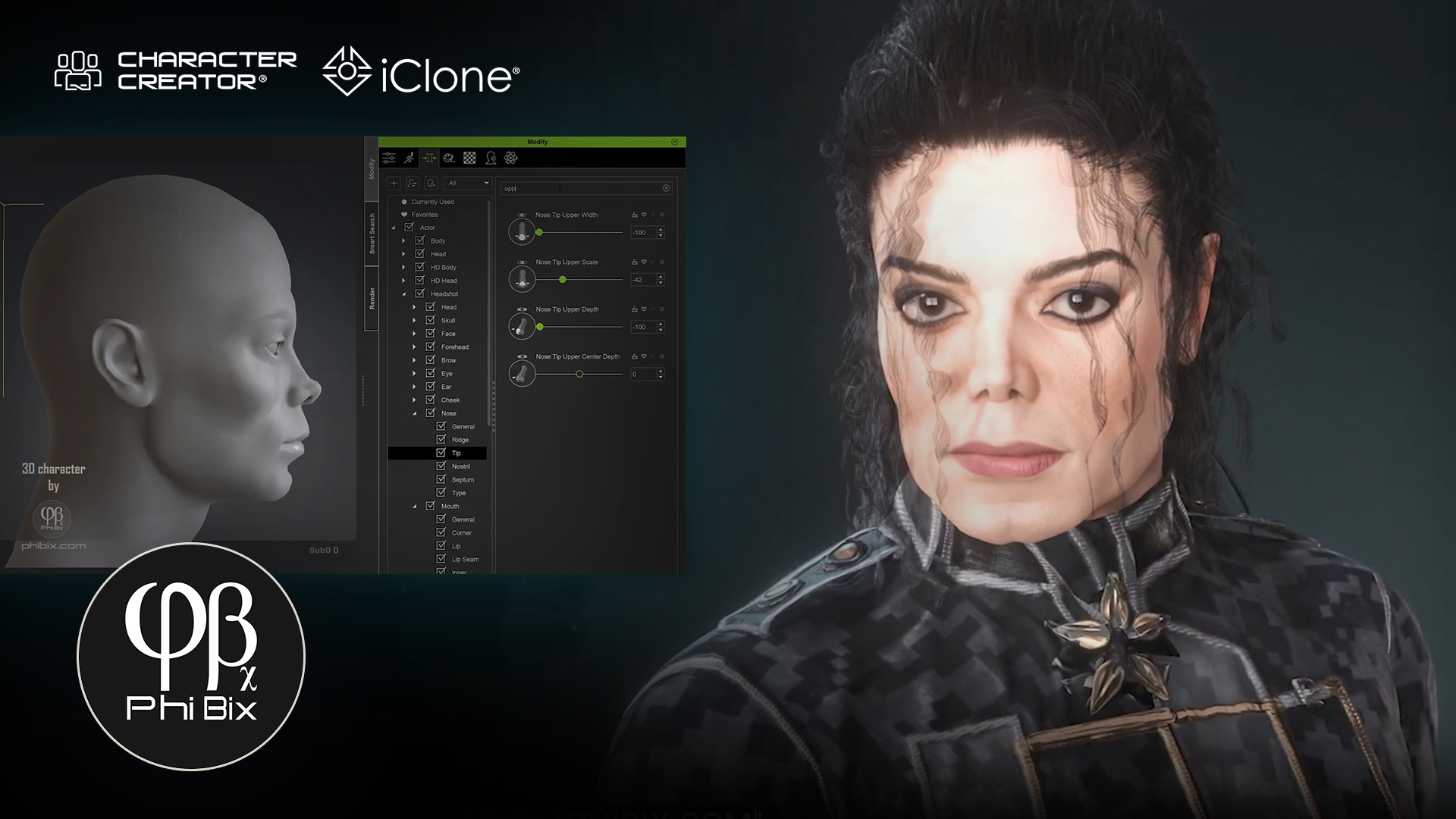
TL;DR: Solo 3D artist PhiBix built a photoreal Michael Jackson character creator digital double starting from a hand-drawn pencil sketch and finishing inside iClone, using nothing but Reallusion’s own tools: Character Creator 5 morph sliders, Mesh Editing, SkinGen, and Content Store hair and wardrobe. No ZBrush. No Blender. No Substance. The project, capped off by a Smooth Criminal-flavored musical that turns the sculpting process itself into lyrics, is a working argument that the King of Pop’s likeness can be achieved entirely inside one ecosystem.
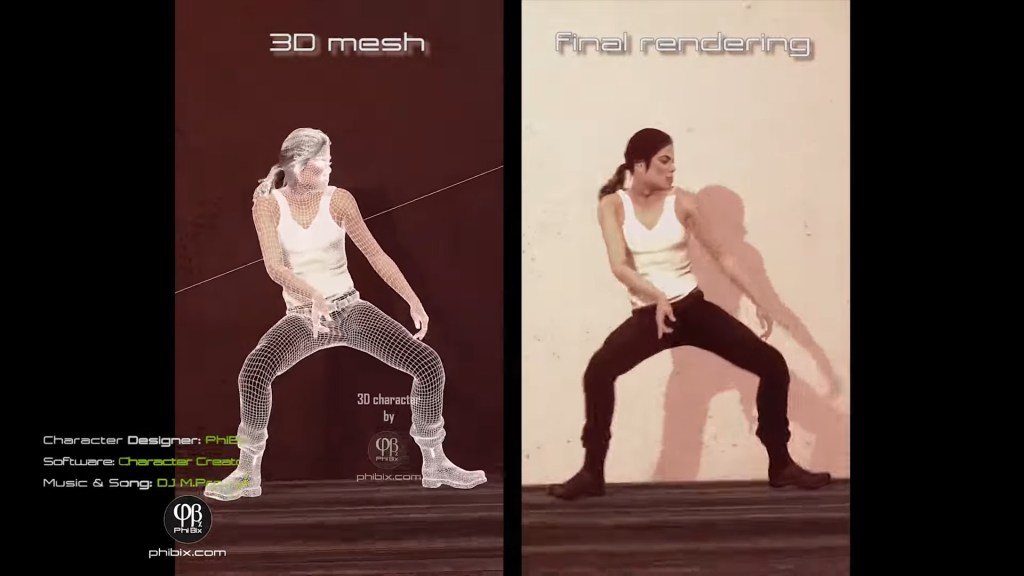
When most digital double case studies say “all-in-one,” they still pass through ZBrush for sculpting and Substance for textures. PhiBix’s MJ tribute project does not. Working from a private studio under the handle phibix.com, the artist has been quietly building one of the most recognizable musician digital doubles on YouTube, a likeness used across multiple short films including a recreation of the demolished In the Closet set in Bombay Beach, California. The pipeline runs entirely on Character Creator 5 and iClone.
A King of Pop Built Without a Pipeline
The MJ digital double is the spine of PhiBix’s tribute work, a single character asset reused across multiple shorts, each one rebuilt around it. What makes the project notable isn’t just the likeness; it’s the route PhiBix took to get there. The entire character (head, skin, hair, wardrobe, performance) is built without ever leaving Reallusion’s own tools. No ZBrush. No Substance. No Blender. The “pipeline” most digital double artists assume is required simply isn’t part of his.
The work doesn’t start in 3D, though. Before opening Character Creator, PhiBix grounds each MJ build in a hand-drawn pencil sketch, a traditional portrait study that fixes the proportions, the bone structure, and the era-specific likeness he’s chasing before a single morph slider gets touched. The sketch becomes the brief he sculpts against. It’s an old-school move that anchors a very new-school pipeline.
The most recent release is a Smooth Criminal-flavored musical in which PhiBix writes the modeling process into the lyrics themselves. The song opens on “a whisper of bone, curves of a skull like the half-remembered home,” and walks the listener through jawline, eyes, lips, skin pores, and final lighting. Every verse is a stage of the build. By the chorus, the face has rendered into recognizability and the lyric drops the reveal: “From data to identity. I know that face.” A self-aware framing that doubles as a thesis: a digital double is an act of recognition, not just reconstruction.
The earlier In the Closet recreation short shows the same MJ asset in a fully rebuilt 1992 Herb Ritts environment, including the demolished Bombay Beach location, a working saqiya, and the sepia desert palette of the original music video. Same character, different scene. That asset reuse is only possible because the character was built inside a system designed for it.
The All-Reallusion Pipeline
The question PhiBix’s work answers: can a single artist hit musician-level likeness without leaving the Reallusion stack?
Stage 1, Pencil sketch for the brief
A traditional hand-drawn portrait of MJ fixes the proportions and era-specific likeness before any 3D work begins.
Stage 2, Character Creator 5 for the head, body, and likeness
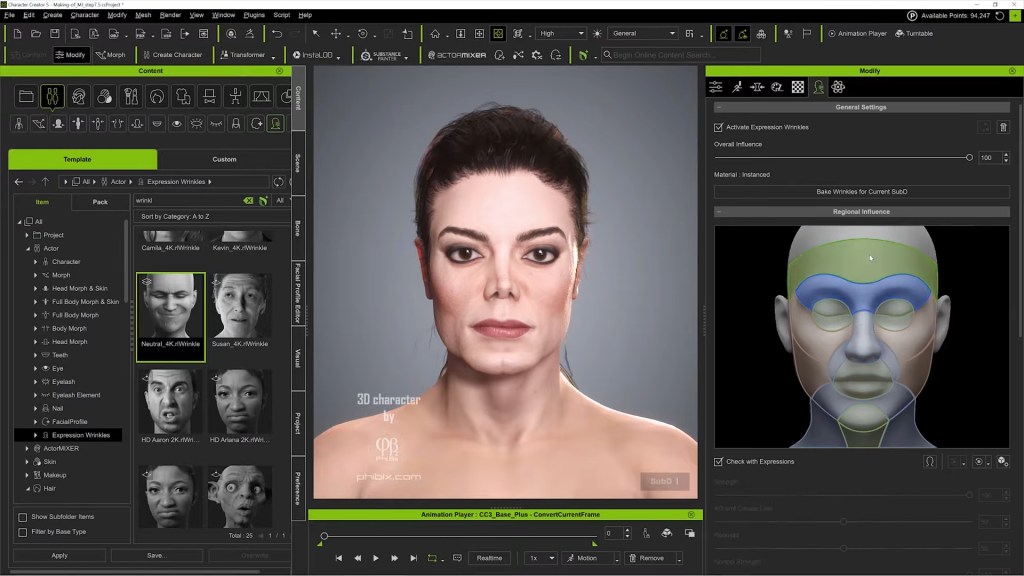
Morph sliders and Mesh Editing shape the skull, jaw, brow, and facial structure to match MJ’s distinctive bone structure, no external sculpting required.
Stage 3, SkinGen for the skin
Layered material synthesis builds the pore detail, blemish maps, and subsurface depth that sell the close-up shots.
Stage 4, Content Store hair and wardrobe
Curls, jackets, and the In the Closet outfit are sourced from Reallusion’s own content ecosystem and conformed to the character.
Stage 5, iClone for performance and staging
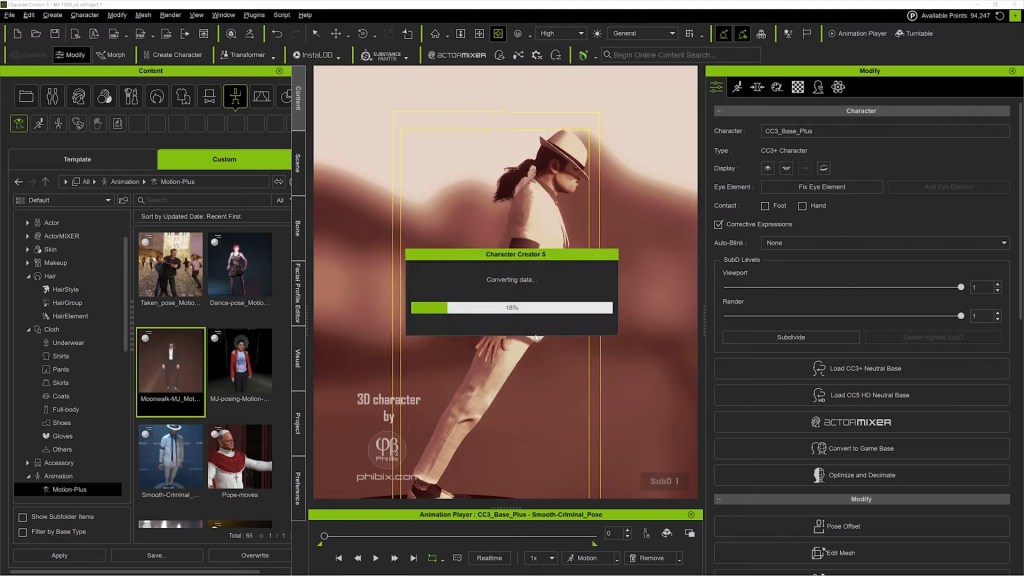
The finished CC5 character is sent to iClone for facial animation, dance choreography, and multi-camera direction.
The core insight: when the character base, the skin system, and the wardrobe library all live inside the same topology, the “asset-handoff tax” disappears.
Character Creator 5: The Likeness Engine
PhiBix’s MJ proves that character creator digital double work no longer needs to escape to ZBrush for the hard sculpting calls. Two CC5 capabilities carry the weight.
Morph sliders and Mesh Editing as a sculpting language
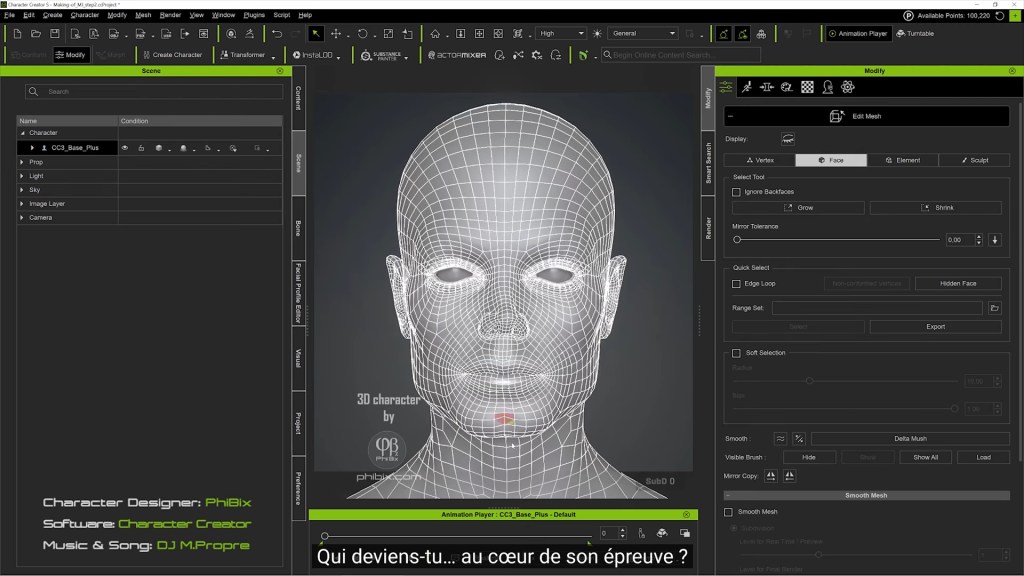
The lyrics describe the process explicitly: “Curves of a skull like the half-remembered home. Jawline drifting into place.” That’s morph-slider work, not freeform polygon pushing. CC5’s Morph System gives PhiBix directional control over the skull, brow ridge, cheekbones, and jawline without entering a sculpt application. For the corrections that morphs can’t reach, Mesh Editing handles the targeted vertex-level work directly inside Character Creator. Together, the two tools cover the territory most workflows hand off to ZBrush, and the character stays on CC3+ topology throughout, so animation deformation never gets compromised.
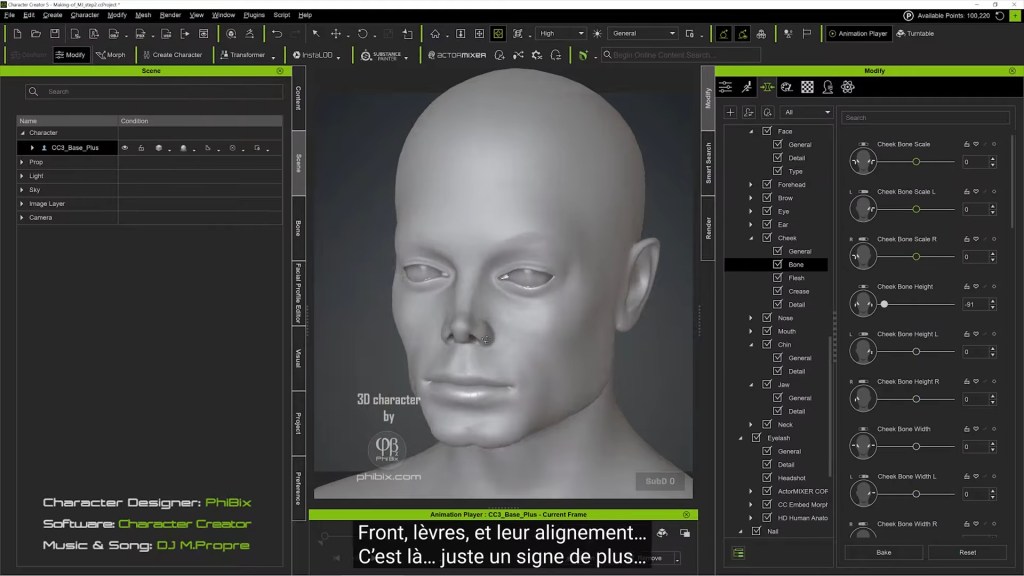
For a face as scrutinized as Michael Jackson’s, that matters. The eyes have to read MJ. The jawline has to read MJ. PhiBix’s lyric, “Every angle, story untold. Every shadow rendered in gold. I’m watching hard in suspense, who are you behind that sense?”, captures the iterative recognition test. The artist watches the face accumulate identity slider by slider, vertex by vertex, against the pencil-sketch brief.
SkinGen for the texture layer that sells the close-up
Photoreal celebrity likeness fails most often in skin, not bone structure. SkinGen handles that layer natively inside Character Creator: pores, micro-detail, blemishes, subsurface tone, through stackable material layers rather than a separate texturing application. The lyric “Every pore, every glance, every subtle hue. Now the truth is undeniable. It’s you” is functionally a description of what SkinGen contributes to the build: the final 5% of photoreal recognition that lives in the skin.
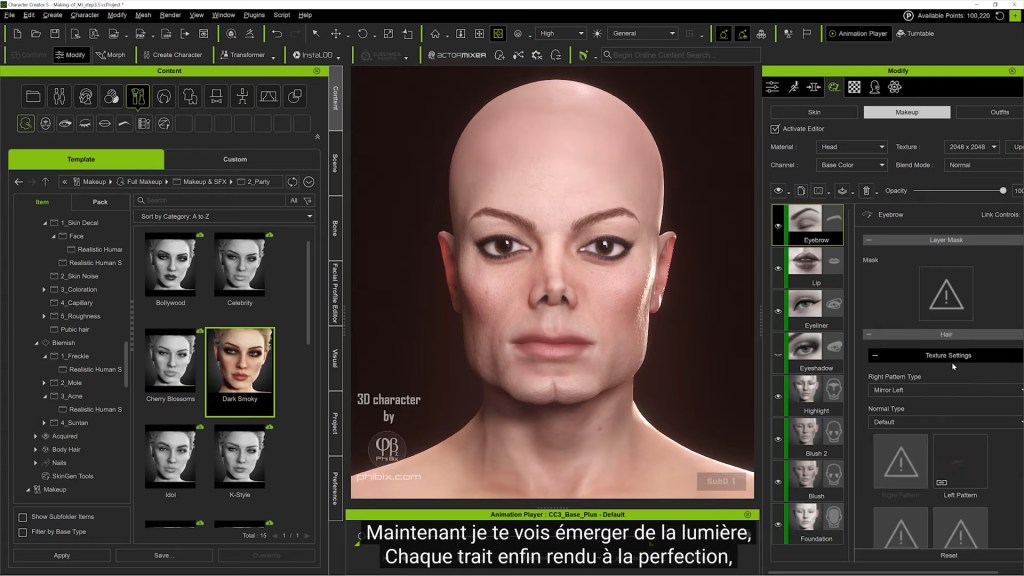
The outcome: a character that holds up under iClone’s close-up camera rigs without round-tripping through Substance Painter.
Content Store: Find MJ’s clothes and hair
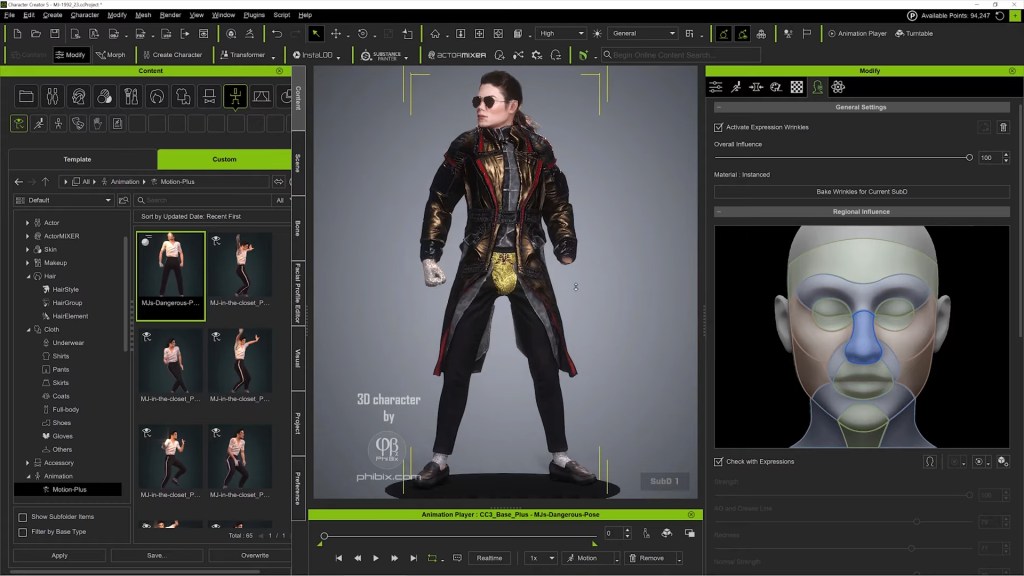
The MJ outfit and signature curls are sourced from the Content Store and the marketplace ecosystem, assets built natively against CC topology, so they conform without breakage. For a tribute project where wardrobe accuracy carries the period (this is 1992 MJ, not 1987 MJ), having a deep first-party library matters more than a generic universal-fit system.
Why an All-Reallusion Digital Double Matters
The dominant assumption in the digital double space is that getting from “good 3D character” to “convincing real person” requires a tool chain: ZBrush for the hard sculpting, Substance for the textures, Marvelous for the wardrobe, then somewhere downstream for animation. Each handoff costs time, file-format friction, and topology integrity.
PhiBix’s MJ project is a counter-example. The whole likeness (head, skin, hair, wardrobe, performance, camera) lives inside one ecosystem. For a solo artist or small studio chasing musician-grade likeness on a release cadence, that’s the difference between shipping a music video and shelving one.
It also reframes what Character Creator is for. Most marketing positions CC as a fast character base that you finish elsewhere. PhiBix’s work positions it as the finishing tool, the place the digital double becomes the digital double, not the place you start before going somewhere serious.
Key Takeaways for Solo Digital Double Artists
- Start with a pencil sketch, not a Character Creator preset. A traditional portrait study fixes proportions and era-specific likeness before any 3D work begins, and gives the artist a brief to sculpt against.
- Treat morph sliders and Mesh Editing as a primary sculpting pair. CC5’s Morph System plus vertex-level Mesh Editing can carry full musician-grade likeness work without an external sculpt application.
- Let SkinGen own the texture pass. Native skin layering inside Character Creator hits the photoreal threshold that usually requires Substance Painter, and it stays in the same scene as the morphs.
- Build the digital double to be reused. One MJ asset, many shorts. The investment pays back across a portfolio, not a single release.
- Direct inside iClone, don’t just animate inside it. Multi-camera staging, lighting, and the virtual set should live in the same scene as the performance, that’s where the solo-director workflow becomes possible.
FAQ: Character Creator Digital Double
Q: Can I build a celebrity-likeness digital double using only Character Creator and iClone, with no third-party tools?
A: Yes. PhiBix’s Michael Jackson project demonstrates exactly that. CC5 morph sliders and Mesh Editing handle the structural likeness, SkinGen handles the photoreal skin pass, and Content Store hair and wardrobe finish the look. The character animates and performs in iClone. No ZBrush, no Substance, no Blender required.
Q: Do I need Headshot 3 to create a digital double in Character Creator 5?
A: Headshot 3 accelerates the process by generating a likeness base from photo reference and AI image-to-3D reconstruction, but it isn’t strictly required. Pure morph-slider and Mesh Editing sculpting can reach the same destination, as PhiBix’s work shows. Headshot 3 simply gets you there faster, especially for first-time digital-double artists.
Q: How do I get Character Creator 5 and iClone for digital double work?
A: Both are available from the Reallusion Software Store. Character Creator 5 also offers a 30-day free trial, which is enough time to test a full digital-double build end-to-end before committing.
Q: Does the digital double from Character Creator work with other 3D tools if I want to expand later?
A: Yes. CC5 characters export cleanly to Blender, Unreal, Unity, and Maya through Reallusion’s Auto Setup plugins. PhiBix’s project keeps everything inside CC5 + iClone by choice, but the same character asset is portable when a project needs it.
About the Artist
PhiBix is a 3D artist and animator producing musician tribute work centered on Michael Jackson, with shorts and music videos released on YouTube and full build documentation available to subscribers at phibix.com. His pipeline relies entirely on Reallusion’s Character Creator and iClone, including a fully recreated 1992 In the Closet set built around the demolished Bombay Beach location used in Herb Ritts’s original video. PhiBix grounds each build in a hand-drawn pencil sketch before any 3D work begins, and his recent Smooth Criminal-flavored musical weaves the modeling process into the song’s lyrics, a working statement that, for him, the craft and the homage are the same act.
Related Article