 |
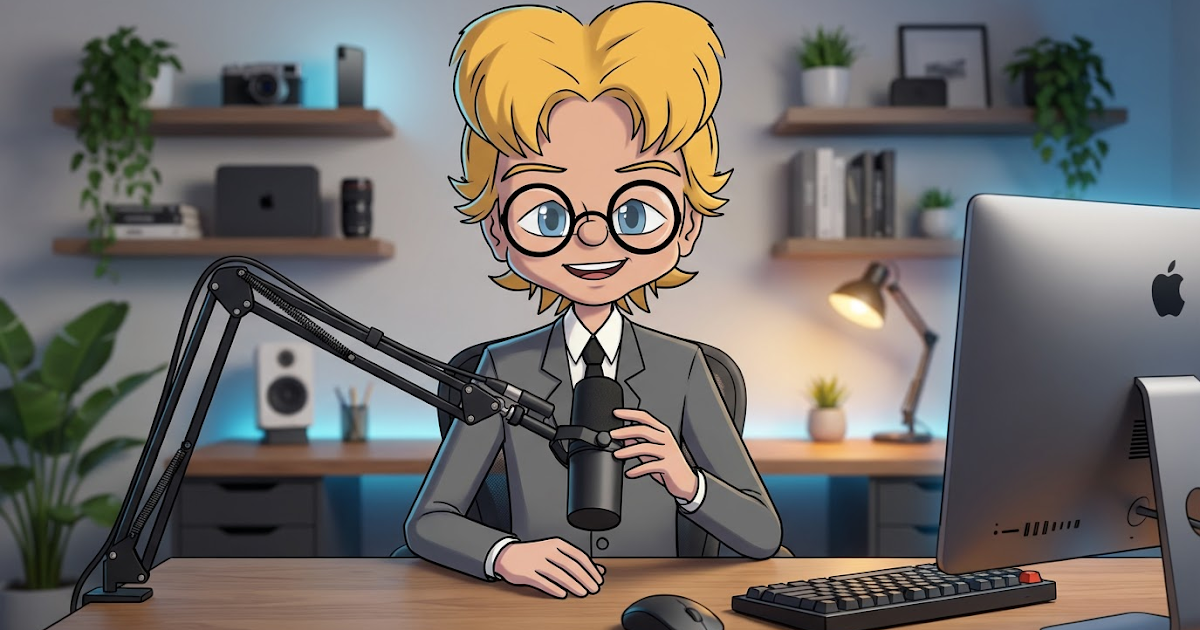
| From this one AI generated image I created a talking head scene with two additional camera angles using OpenArt.AI. |
As a solo creator, I didn’t get into animation and making 2D animated cartoons because I just love the craft of animating. I got into it because I am a cartoonist who wanted to see my characters come alive as animated cartoons. I’ve always loved animated cartoons and I wanted to see my own characters in their own cartoons.
While I love traditional hand drawn animation, I have never had any desire to sit down to draw and ink hundreds of drawings just to achieve a single minute of animation. Though I have created hand drawn, looping animations of 1 to 2 seconds every now and then and, back in the day, very low frame count digital cartoons.
Reallusion’s Cartoon Animator
It wasn’t until Reallusion came along with Cartoon Animator (then known as CrazyTalk Animator Pro), somewhere around 2012, that I found an affordable way to animate my own 2D artwork without requiring me to draw anything except the initial character designs for the character puppet rigs.
Fast forward to today and Cartoon Animator has evolved into, what I believe, to be one of the fastest, and easiest to learn, applications for creating 2D puppet rig animation – that even has the option to include hand drawn animated elements to make the puppet rig style less obvious.
I say that with some authority since I have spent time learning Cartoon Animator’s nearest rival, Moho, in depth, going through two lots of Moho training, totalling more than 100 videos. I’ve yet to make a single, complete animated cartoon with Moho. It’s too much work for me.
If you want to make animation quickly, with your own art, Reallusion’s Cartoon Animator is affordable and features one of the fastest workflows of any animation software (including Adobe Animate). I can get a beginner animating to a relatively high level of competence with the software in a weekend through my Lazy Animator, Cartoon Animator Courses.
Enter 2D AI Animation
I’ve been following the development of generative AI animation since the very concept started to take shape a few years ago. It’s gone from “Yeah, it’s not going to replace Cartoon Animator any time soon” to “Do I even need Cartoon Animator?” in the last few months (basically since the release of Google’s Nano Banana – which really has been a game changer).
Now we have various all in one AI tools that give you access to different AI models, and let you generate almost everything you need to make a complete animated cartoon, or even something that could pass for a live action film. I’m not talking ‘AI Slop’ either. I’m talking, you take the role of director and use the speed of AI to design and animate your characters in your stories.
My preferred tool is OpenArt.ai.
 |
| OpenArt.AI is an all-in-one AI generation platform. |
A Simple Example
 |
| Screenshot from my Animating Talking Heads Cartoon Animator course for beginners. |
For years my go to lesson for Cartoon Animator beginners has been to teach them how to animate a talking head video. A character speaking to camera, with appropriate facial expressions, upper body movement, and hand gestures.
Once you have your character rigged and ready to go, you can get the bare bones of a character speaking to camera and animated in maybe 30 minutes for a ten to twenty second monologue. To do it really well, it’s going to take at least an hour or so to make sure the lip sync is good, and the face and hand animations align with what is being said.
You can even vary the camera between medium and close up shots if you want to look even more accomplished.
In contrast, with OpenArt AI, I can make a consistent character of my Avatar from a single image, put them into a scene, instantly create multiple camera angles of the same scene, then turn everything into animated videos complete with pretty good character lip sync (to a recording of my own voice or AI voices) with appropriate facial expressions and hand movements.
 |
| Once you have your various character angles, it’s literally a quick prompt and one button click to create the animation on each camera angle. |
Once I have the same scene animated from multiple different angles, I just take everything into my video editor and cut them together to create a single scene filmed with multiple camera angles. See the demo video below which took maybe 20 to 30 minutes to make, starting with a single front facing image of my Avatar sitting at a desk.
That’s pretty much where we’re at with generative AI. It’s not perfect but it’s good enough in the right creator’s hands. If I can create this from a single AI generated image of my character, what would I need Cartoon Animator for?
Given, this is a very simple example but, if you’re primarily animating talking head style videos, and you just want the fastest creation method possible, AI wins, hands down.
Multiple Characters and AI
If you want to animate a scene with multiple characters speaking within the same camera shot, AI still struggles with this. It can do it but the number of useless generations certainly increases. However there are work arounds.
One method is to generate each character individually on green screen backgrounds and then composite them together into a single scene in your video editor. Which can work well and be a little more reliable.
It’s not ideal but still comparable to animating the entire scene in Cartoon Animator.
Do You Even Need Cartoon Animator?
At this point Cartoon Animator is fast becoming a scene posing stage for creating first (and even last frames) that AI can animate. Except you don’t even need it for that.
AI can take a bunch of elements and combine them in a scene based on your prompts too. You may not have precise control, like you would in Cartoon Animator but you’re also not restricted by whatever angles you have available of your puppet rigged characters.
Thinking of generative AI’s catch cry of ‘This is the worst it will ever be” is there even a need for Cartoon Animator, if not now, then in a year or two?
The Answer is YES and NO
Depending upon how you feel about generative AI animation your answer will be one or the other.
If you despise anything and everything AI in creative fields, then Cartoon Animator is, arguably, the fastest way to produce 2D animated cartoons without AI. I would still highly recommend the software to you.
On the other hand, if you’re open to exploring generative AI in your workflow then you may want to keep Cartoon Animator around. However, as you get more confident in how to use AI tools, you will definitely start to question if Cartoon Animator is actually adding in extra steps to your workflow rather than making it quicker?
If Reallusion have plans to release Cartoon Animator 6 this year, it’s going to need to bring something really unique, possibly incorporating specialist AI tools, to keep the software relevant moving forward.
o—o— —o— o—
Did you find this article useful?
Subscribe to my newsletter and get the
latest articles delivered to your inbox.