
404 errors are among the most common website errors you’ll encounter. You’ve probably seen one yourself: you click a link expecting to find a page, only to be met with a message such as “404 – Page Not Found”.
A 404 error means that the server couldn’t find the page or resource requested at that URL.
They’re common because URLs can change, pages can be deleted and, sometimes, people simply type the wrong address. But while you can’t prevent every 404 error, it’s important to keep an eye on them and fix the ones that could affect your visitors.
What causes a 404 error?
There are several reasons someone might encounter a 404 error on your website:
A page has been deleted
Someone follows a link or bookmark to a page that no longer exists.
A URL has changed
You’ve moved a page to a new URL without redirecting the old one.
A link contains a typo
An internal or external link points to the wrong URL.
Someone types the URL incorrectly
A visitor might enter the wrong address directly into their browser. For example, entering 123-reg.co.uk/domain-nmes instead of 123-reg.co.uk/domain-names would result in a 404 error.
An external website has an outdated link
Another website may still link to a page you’ve removed or moved.
This is why 404 errors are so common. Sometimes they’re caused by something you’ve changed, while other times they’re simply the result of a visitor entering an incorrect URL.
Are 404 errors bad for my website?
A single 404 error isn’t necessarily a problem. In fact, it’s impossible to prevent every one. Visitors will occasionally mistype URLs, and old links around the web can remain long after a page has been removed.
The problem is when important pages return 404 errors or visitors regularly encounter broken links while browsing your site.
Imagine someone clicks a link in a marketing email expecting to see a special offer, only to land on a 404 page. They may simply leave your website and look elsewhere.
The same applies to internal links. If someone is browsing your website and clicks a link that leads to a missing page, it can interrupt their journey and make it harder for them to find what they need.
This can be particularly damaging if a 404 occurs on an important page, such as a product, service, contact or checkout page.
Are 404 errors bad for SEO?
404 errors don’t automatically harm your search rankings. Google understands that pages are sometimes removed and that visitors occasionally request URLs that don’t exist.
However, broken links and missing pages can still create problems for your website. They can make it harder for visitors to navigate your site and can prevent them from reaching useful content.
If you’ve removed or moved a page that still has useful links pointing to it, a 301 redirect can also help send visitors and search engines to the relevant new page.
So you shouldn’t try to eliminate every 404 response. Instead, focus on fixing useful or important URLs that shouldn’t be returning a 404.
See also: What is Search Engine Optimisation?
How do I find 404 errors on my website?
Before you can fix 404 errors, you need to know where they’re occurring.
Google Search Console can help you identify URLs that Google has attempted to access but couldn’t find. It’s a useful starting point for finding missing pages and checking whether any important URLs need attention.
You should also check your website’s internal links. If you’ve deleted or moved a page, make sure you haven’t left links elsewhere on your site pointing to the old URL.
It’s worth checking links used in other places too, particularly:
☐ Email campaigns
☐ Social media posts
☐ Online advertising
☐ Important pages on your website
☐ Links provided by other websites
Pay particular attention to important landing pages, product pages and pages involved in your sales or enquiry process.
How do I fix a 404 error?
The right way to fix a 404 depends on why the page is missing.
If the page was deleted by mistake, restoring it may be the simplest solution.
If the page has been moved to a new URL, you should normally set up a 301 redirect from the old URL to the new one. Anyone visiting the old address will then be sent to the new page instead of seeing a 404 error.
If the broken link is on your own website, you can also update the link so that it points to the correct URL.
And if a broken link appears on another website, you can contact the site owner and ask them to update it.
The important thing is to choose the solution that makes sense for the visitor. Don’t redirect every broken URL to your homepage simply to avoid a 404. If there’s no relevant replacement page, allowing the URL to return a 404 is often the better option.
When should I use a 301 redirect?
A 301 redirect is useful when a page has permanently moved to another URL and the new page serves a similar purpose.
For example, imagine you have a product page at:
example.com/old-product
You’ve replaced that product with a new version at:
example.com/new-product
A 301 redirect can send anyone visiting the old URL to the new product page.
However, redirects shouldn’t be used as a catch-all solution. Redirecting an old contact page to an unrelated page listing your products, for example, isn’t helpful to visitors.
If there is no relevant replacement for a deleted page, it’s usually better to let the old URL return a 404.
For more, check out: Local SEO in 10 – How Do I Get My Business Found Online?
How can I create a useful 404 page?
You won’t be able to eliminate every 404 error. Visitors will always mistype URLs, and people may follow old links from elsewhere on the web.
That’s why your website should have a useful, custom 404 page rather than simply displaying a technical error message.
A good 404 page can include:
☐ A clear message explaining that the page couldn’t be found
☐ A link back to your homepage
☐ Your main website navigation
☐ A search function
☐ Links to useful or popular pages
The aim is to give visitors somewhere to go next rather than leaving them at a dead end.
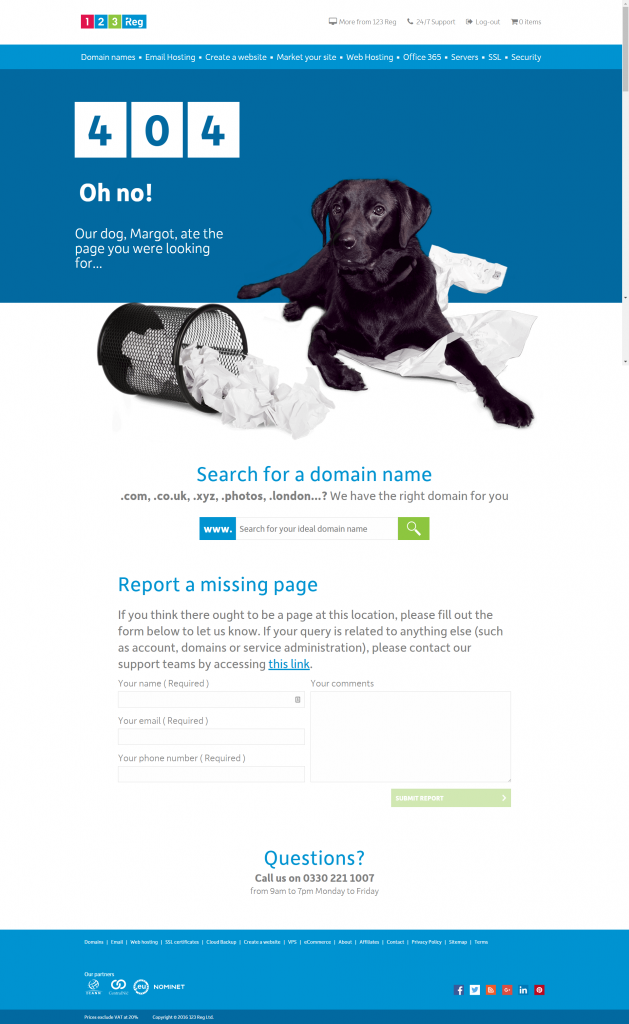
For example, the 123 Reg 404 page includes the main site navigation, a domain search and an option for visitors to report a missing page.
So instead of being a dead end that may lead someone to leave your website, a useful 404 page gives visitors another way to find what they’re looking for.
How can I prevent 404 errors in the future?
You can’t prevent every 404, but a few simple checks can reduce the number of broken links visitors encounter.
Before sending a marketing email, publishing a social media post or launching an advertising campaign, check that every link points to the correct page. Including a link that leads to a 404 error in a promotional message could mean losing potential customers.
When you remove or move a page, check whether other pages on your website link to its old URL. Where there is a relevant replacement, set up a 301 redirect.
It’s also worth monitoring your website regularly so that you can spot important broken links before they affect too many visitors.
Most importantly, keep an eye on the pages that matter most to your business. An occasional visitor mistyping a URL isn’t something to worry about, but a product or contact page unexpectedly returning a 404 could mean lost customers.
What should I do if I find a 404 error?
Don’t panic. A 404 error isn’t automatically a sign that something is seriously wrong with your website.
First, work out why the URL is returning a 404 and whether the page should still exist. Then choose the appropriate solution:
☐ The page should still exist: Restore it.
☐ The page has moved: Set up a 301 redirect to the new URL.
☐ Your website contains the broken link: Update or remove the link.
☐ Another website contains the broken link: Contact the site owner and ask them to update it.
☐ The page has genuinely been removed with no replacement: A 404 is usually appropriate.
The key is to focus on the 404 errors that affect real visitors and important pages, rather than trying to eliminate every possible 404 response.
Summing up
404 errors are a normal part of running a website, but that doesn’t mean you should ignore them.
Regularly check for broken links, fix important missing pages, use redirects when content has moved and give visitors a useful 404 page when they do encounter a missing URL.
A little maintenance can make it much easier for visitors to find what they’re looking for and reduce the chance of broken links getting in the way of enquiries or sales.