4 minutes read
Published Jul 30, 2026
Clio Work is Clio’s legal AI workspace, built to draft, research, and analyze alongside you while adapting to how you work best. It’s leveling up and now shows up in more of the places you already work.
Clio for Word brings Clio Work into Microsoft Word. Clio Grow data and insights can now be surfaced in Clio Work. Skills allow Clio Work to save how you want work performed so your tone, structure, and standards are always accounted for. Memory brings context forward from every past interaction, so how you work is never forgotten.
Here’s what’s new:
- Clio for Word: Legal AI inside your word processor
- Grow Intelligence: Business development that reads the signal
- Skills: Your way of working, codified and scaled
- Memory: Clio Work now remembers everything

Clio for Word: Legal AI inside Microsoft Word
Most lawyers live in Microsoft Word. Until now, that meant copying and pasting text, and jumping back and forth between multiple tools to work with AI.
Enter: Clio for Word.
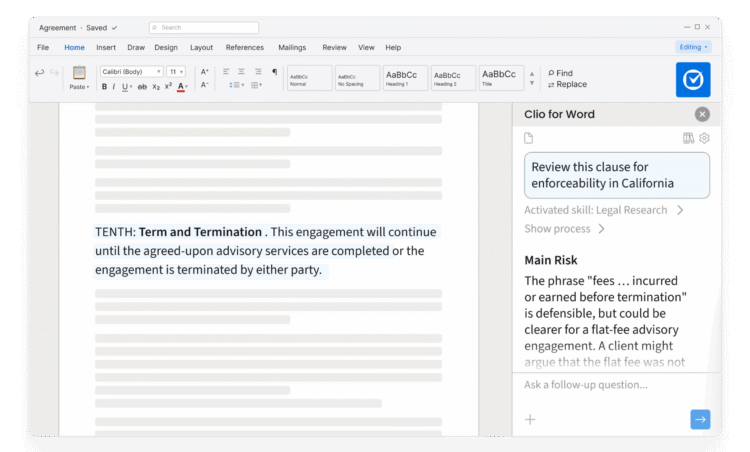
Clio for Word brings Clio Work’s drafting, analysis, and review directly into the environment where most legal professionals work every day.
Lawyers can now leverage one of the world’s largest legal libraries to generate drafts and adapt precedents, all while receiving revision suggestions. Matter context and firm precedent follow you into Word, so drafting, revising, and reasoning is always informed by past legal work.
What you can do
- Draft in seconds, with full context: Generate drafts and adapt precedents, with the context of your matter and relevant case law.
- Revise with control: Clio Work reads the active document, proposes edits as track changes, and iterates conversationally.
- Analyze with confidence: Surface legal, structural, and persuasive risks. Every research result is citation-backed and linked to its source, so you know exactly where your insights come from.
Clio Grow Integration: The full client picture, from intake to active matter
A client’s story rarely starts when a matter is opened. There’s usually an intake form, a consultation, and a signed engagement letter before any of that happens. For firms using Clio Grow, that context has always lived there.
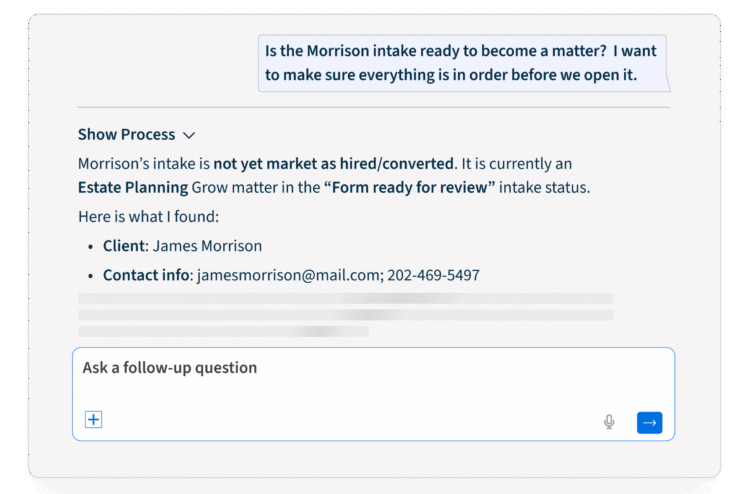
Now it’s connected. Clio Work can access your Clio Grow data directly, so the full client picture across intake responses, consultation details, pipeline stage, and signed documents is right there when you need it, without switching between tools.
Not on Clio Grow yet? This is a good reason to take a look. Firms that use Clio Grow alongside Clio Work get a complete view of the client journey from the very first inquiry, with Clio Work able to act on that context the moment a client is ready to convert.
What you can do
- Check intake readiness before opening a matter. Ask Clio Work whether a prospect is ready to convert and it will review their intake form, consultation status, and any outstanding requirements, then tell you exactly what’s done and what’s missing.
- Get full client context before starting legal work. Ask for a summary of what you know about a client and Clio Work pulls together the intake form, consultation notes, and submitted documents into a single brief. No digging through Grow manually.
- Convert retained prospects into active matters. Once a client is ready, Clio Work can create the matter using the intake details already collected. You review a preview and confirm before anything changes.
- Follow up on stalled intakes. Ask why an intake isn’t ready and Clio Work identifies the gap. Tell it to send a reminder and it drafts the follow-up using the right Grow template, ready for your approval.
Every action is confirmed before it happens. Clio Work shows you what it found and what it plans to do, and you stay in control throughout.
This release is only available to firms who have Clio Grow & Clio Work.
Skills: Save how you work so Clio Work matches your standards
Every legal professional has their way of working: unique standards, structure, and tone. Until now, that knowledge lived in a person’s head or in a shared document. Now it is integrated directly into Clio Work.
With skills, Clio Work can save each firm or legal professional’s unique way of working and apply it consistently, helping teams operate efficiently at scale. Examples include the way a partner likes their demand letters drafted, how redline analysis is written, or the matter summary format the firm has standardized are all applied each time Clio Work performs that task.
Two types of skills
- Custom skills: Describe in plain language your preferences and standards for a specific task or outcome, and Clio Work saves those directions as a reusable skill. Building skills is as easy as starting a conversation with Clio Work. You can also dive deep into specific edits in the Skills editor.
- Pre-loaded skills: Built by Clio, skills like “discovery review” and “memo drafting” are available to use right away to get you started.
Check out this video to see skills in action.

Memory: Clio Work now remembers everything it’s done
Clio Work always understood your matter and the relevant law. But knowledge captured during one conversation did not extend to future ones.
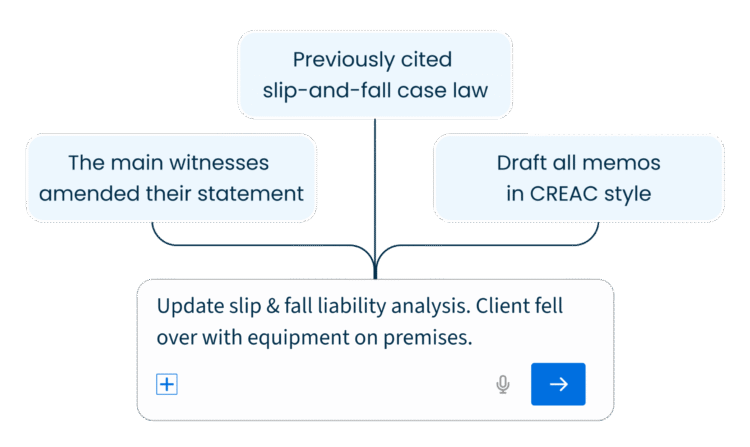
Now Clio Work retains everything. It can draw on past interactions to surface how a task was done, the parties involved, drafting decisions, and individual preferences like style and tone. This helps legal professionals pick up where they left off, even if they haven’t worked on the matter in a while.
What Memory holds
- Key facts: including parties, jurisdictions, and matter changes.
- Individual preferences: including drafting style and tone.
- Past conversations: including related legal outcomes and what you did previously.
Looking ahead
If you haven’t tried Clio Work yet, now is a great time to see what it can do for your practice. Start your free trial and put it to work on your next matter.
Start your free Clio Work trial
If you haven’t tried Clio Work yet, now’s the time. Start your free trial and put it to work on your next matter.

Loading …