

Product lifecycle management systems hold years of engineering work and sensitive product information. Managing access to these records becomes more complicated when different departments and external suppliers need to work with the same data. Propel PLM security uses Salesforce’s permission and record-sharing capabilities to control who can access or modify product information. Understanding these controls is an important part of planning a migration, particularly for organizations considering Propel PLM services to move from Oracle Agile PLM.
How does the Propel PLM security model work?
Propel PLM runs natively on Salesforce and uses its security framework to control user permissions and record visibility. Administrators can manage which actions users are allowed to perform and which product records they can access. These controls work alongside Propel’s application-specific permissions and lifecycle rules, allowing organizations to configure access according to their business requirements.
This distinction becomes useful when an organization needs different access rules for engineering and external suppliers. An engineer may need permission to modify an unreleased item, while a supplier should only see the approved information relevant to its work. Salesforce permission sets control the available actions, while record-sharing mechanisms determine access to individual records.
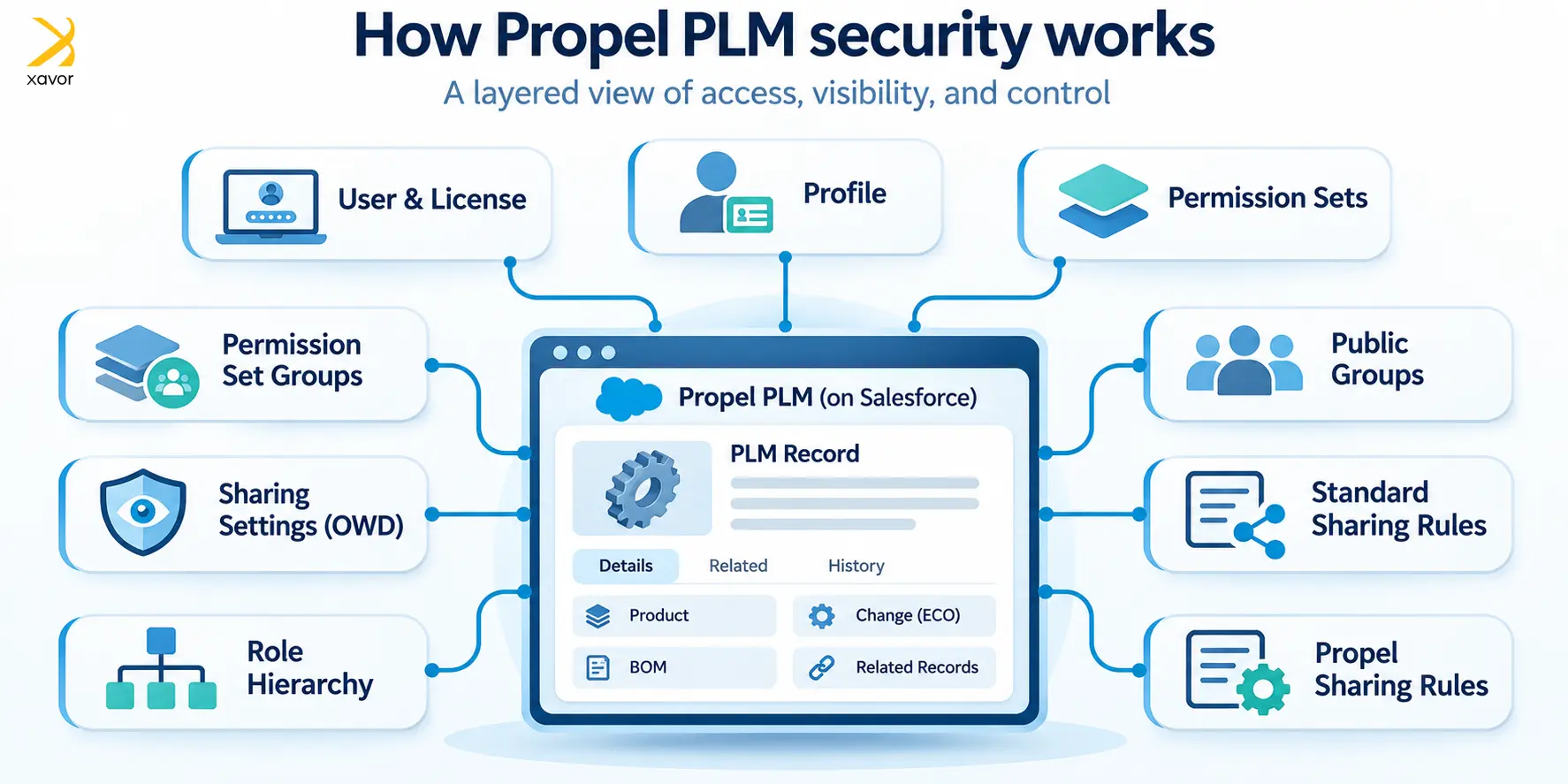
The security layers in Propel PLM
Propel runs natively on Salesforce, so it uses a layered security model. Each layer helps answer two questions: What can this user do? And which records can they see?
| Layer | Question it answers | What it controls |
| User & License | Can they log in and use Propel? | Salesforce user account, required licenses and authentication settings, including SSO |
| Profile | What is their baseline? | Login hours, login IP ranges, default app and page layouts |
| Permission Sets | What can they do? | Create, read, edit and delete rights on objects, field-level security, Apex class and Flow access, tabs and apps |
| Permission Set Groups | What is their business role? | A bundle of permission sets for one persona, such as Engineer, Document Control, Quality or Approver |
| Sharing Settings (OWD) | What can they see by default? | Baseline visibility for each object: Private, Public Read Only, Public Read/Write or Controlled by Parent |
| Role Hierarchy | Who inherits record access? | Users higher in the hierarchy can access records below them, subject to object sharing settings |
| Public Groups | Who should records be shared with? | Teams, sites or product lines. Groups can sit inside other groups |
| Standard Sharing Rules | Which extra records open up? | Read or Read/Write access based on the record owner or record criteria |
| Propel Sharing Rules | Which related records can users access? | Controls access to related product records, depending on Propel configuration |
These layers work together to determine a user’s effective access. Three main checks apply:
- Can the user log in? This depends on the user account, required licenses and authentication settings.
- Can the user work with this object or field? This depends on permissions granted through their profile, permission sets or permission set groups.
- Can the user access this specific record? This depends on record ownership, OWD, role hierarchy and applicable sharing rules.
OWD establishes default record visibility, while sharing rules and other access mechanisms can grant additional access. Administrative permissions such as View All and Modify All can bypass normal record-sharing restrictions, so they should be assigned carefully. Propel lifecycle controls can also restrict editing after an item reaches its released state, depending on the configuration.
For additional information about the underlying platform, read Xavor’s article on how Propel works with Salesforce. Salesforce also explains these mechanisms in its official sharing and record access documentation.
Configuring Salesforce permissions in Propel
Oracle Agile PLM uses roles containing privilege masks and reusable criteria to determine which actions users can perform on particular records. Over time, organizations may create several similar roles to accommodate differences between departments or product lines. Migrating these roles requires an understanding of the privileges involved and the business reasons behind them.
Propel uses Salesforce permission sets and record-sharing controls, allowing administrators to organize access requirements separately. For example, a permission set granting Change Order editing rights can be reused across different permission set groups. Record-sharing rules can then determine which engineering changes each user can access. This approach can reduce duplication when permissions are planned carefully.
A few features make a difference in practice:
- Muting permission sets: Administrators can suppress selected permissions within a permission set group. However, permissions granted elsewhere remain unaffected.
- Group-based sharing: Public groups can include other groups, allowing administrators to share records with entire departments, sites or product lines.
- Related record access: Propel sharing rules can control access to related product records, depending on the configuration.
- Point-and-click setup: Administrators can manage most standard access controls through Salesforce Setup without custom code.
This makes routine security administration easier, although more complex access requirements may still need technical support.
Administrators should also review how Propel handles access to related product information. For example, granting permission to view an item does not establish that every associated BOM record or attachment is accessible. The required behavior depends on the objects involved and the configured sharing mechanisms.
How does Propel PLM security support controlled approvals?
PLM security influences who can approve engineering changes and release controlled product records. Permission settings establish which users can perform an action, while workflow configuration determines when that action is available. In Propel, lifecycle rules can also restrict editing after an item reaches a released state, depending on the organization’s configuration.
These controls are particularly relevant in regulated manufacturing. For example, an organization may require a designated quality representative to approve an engineering change before release. Administrators must verify that the assigned permissions and workflow conditions enforce this requirement. They should also test whether unauthorized users can change a record after approval.
Audit trails and regulatory requirements
Salesforce provides Field History Tracking for supported fields and Setup Audit Trail for administrative changes. Standard field history is generally available for 18 months through the interface and up to 24 months through the API. Setup Audit Trail retains administrative change history for 180 days. Organizations requiring longer field-history retention can evaluate Salesforce Field Audit Trail.
These capabilities can support audit requirements, although their coverage depends on configuration. Organizations subject to ISO 13485 or FDA 21 CFR Part 11 must assess their documented procedures and validate the relevant system functions. Electronic signatures also require appropriate controls. Salesforce provides further details in its Field Audit Trail documentation.
Case study: Oracle Agile PLM security migration using AI
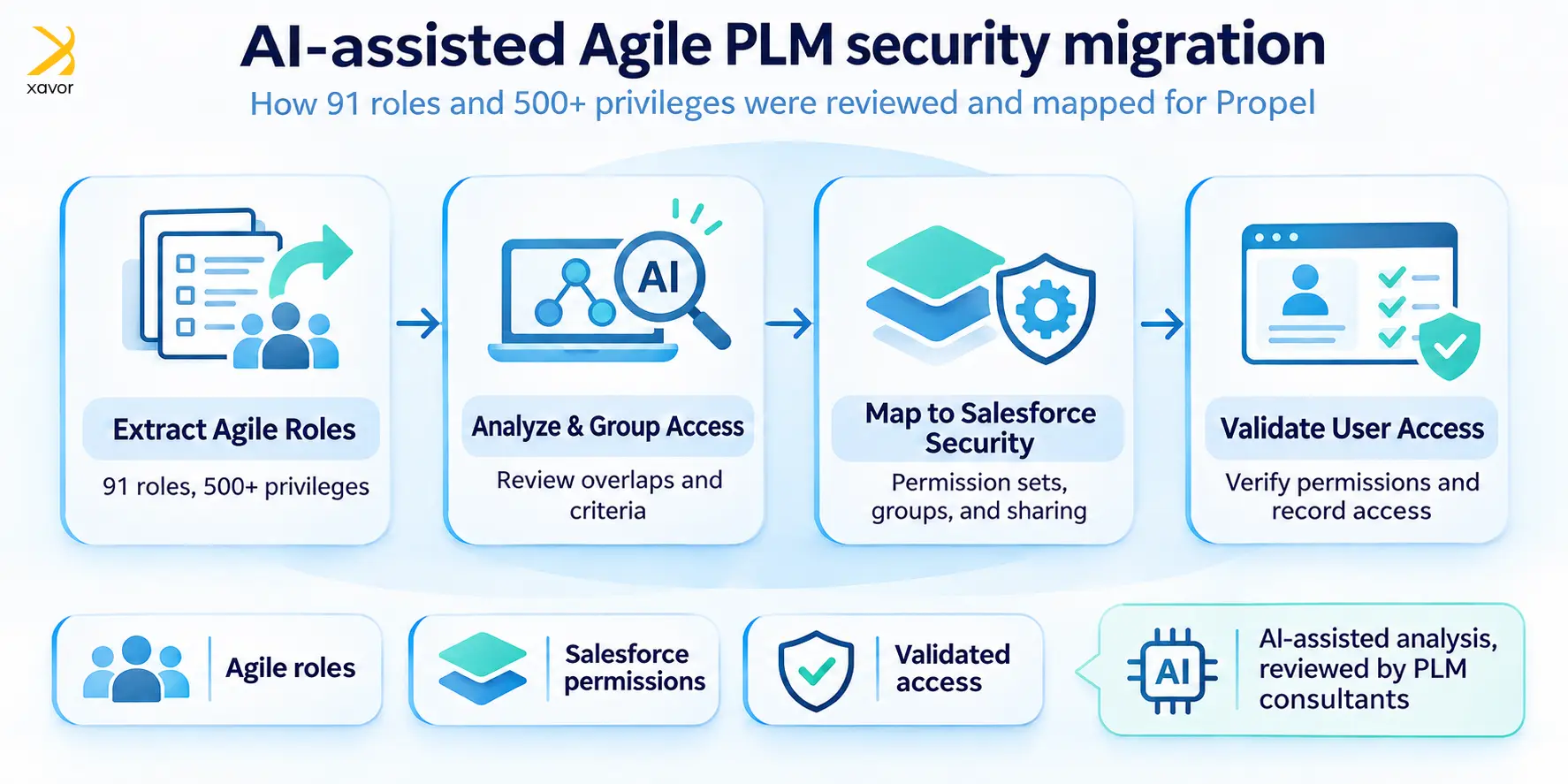
One of Xavor’s clients needed to migrate an Oracle Agile PLM security model containing 91 roles and more than 500 privileges into Propel. The existing model included numerous criteria-based permissions that controlled access to engineering records. Recreating each privilege individually would have required substantial manual analysis, particularly because several roles contained overlapping access requirements.
We used AI to assist with reviewing the existing roles and identifying opportunities to consolidate permissions. Our PLM consultants then evaluated the proposed mappings against the client’s business requirements. The objective was to create a security structure that administrators could maintain in Propel while preserving the required controls over product information.
Mapping Agile PLM privileges to Salesforce security
Oracle Agile PLM and Salesforce use different security models. Therefore, migrating privileges requires functional assessment rather than direct conversion between similarly named controls.
| Oracle Agile PLM security concept | Possible Propel/Salesforce implementation |
| Agile roles | Permission sets and permission set groups |
| Read, Create, Modify, and Delete privileges | Object permissions, with record and field controls where needed |
| Discovery privilege | Record visibility combined with the appropriate object access |
| Applied To attributes | Field-level permissions for applicable Read and Modify requirements |
| Change Status, Approve, and Reject privileges | Propel lifecycle and approval configuration |
| Process extension (PX) access | Permissions appropriate to the replacement implementation |
| User groups | Salesforce public groups or other access structures |
| Criteria-based privileges | Record-sharing rules and application-specific controls |
| BOM and attachment access | Relevant object, field, and record permissions |
The mapping table provides a starting point for designing equivalent access. For example, Agile Discovery privileges influence whether users can locate particular objects. Salesforce record visibility is governed through several mechanisms, so the migration team must test the resulting access rather than assume that a single sharing rule reproduces the original behavior.
Our AI-assisted PLM security migration process
We divided the migration work into eight stages, using AI for analysis while keeping technical decisions with experienced PLM consultants.
- Extract the existing configuration. We collected Agile roles, privilege masks, criteria definitions, and user assignments.
- Analyze overlapping permissions. AI-assisted analysis identified similar roles and repeated privilege combinations.
- Separate permission requirements. We distinguished the actions users could perform from the records they needed to access.
- Create reusable permission sets. Common requirements were grouped into permission sets and assigned through permission set groups.
- Configure record sharing. We translated applicable access criteria into Salesforce sharing mechanisms and reviewed Propel-specific requirements.
- Review the proposed model. PLM consultants checked the mappings against the client’s business processes.
- Demonstrate one permission set group. We configured an initial group and reviewed its behavior with the client.
- Validate and extend the configuration. We tested effective access against the approved requirements before applying the approach to the remaining groups.
The validation stage required particular care. Two users with the same object permissions can still have different record access because of sharing rules or role hierarchy settings. We therefore tested representative users against actual product records to confirm that the intended access restrictions were enforced.
The outcome
According to Xavor’s project account, the migration consolidated 91 Agile roles and more than 500 privileges into a smaller collection of persona-based permission set groups. The resulting structure used reusable permission sets to simplify ongoing administration. The client also approved the initial demonstration before the team continued with the remaining configuration.
The project illustrates how AI-assisted analysis can reduce repetitive work during an Oracle Agile PLM security migration. Human review remains necessary because permission changes affect access to controlled engineering information. For further reading on migration planning, see Xavor’s article on moving away from Agile PLM.
How Propel PLM security compares with on-premises PLM
Propel PLM uses Salesforce’s cloud infrastructure and administration tools. Oracle Agile PLM installations are commonly customer-managed, with security configuration handled through Agile-specific administrative functions. Both platforms support controlled access, although their administration methods and operational responsibilities differ.
| Area | Oracle Agile PLM | Propel PLM |
| Platform | Typically customer-managed infrastructure | Salesforce-native cloud platform |
| Access configuration | Roles, privileges, and criteria | Permission sets and record-sharing controls |
| Administration | Agile administration tools | Salesforce Setup and Propel configuration |
| Login security | Depends on the deployment configuration | Salesforce authentication and supported SSO/MFA options |
| Audit history | Agile-specific audit capabilities | Salesforce auditing and Propel record history, as configured |
| Supplier access | Agile user and privilege configuration | External access governed by licensing and sharing configuration |
| Platform maintenance | Customer manages the deployed environment | Provider manages the underlying cloud platform |
For companies already familiar with Salesforce administration, Propel provides an established set of tools for managing user access. However, the migration still requires careful planning around application permissions and related product records. Organizations should also assess external-user licensing before designing supplier access, since licensing can affect which Salesforce security capabilities are available.
Conclusion
Propel PLM security combines Salesforce permissions with product-specific controls to manage access to engineering information. For organizations moving from Oracle Agile PLM, the transition creates an opportunity to review existing security structures and consolidate repeated permission configurations. The outcome depends on accurate privilege mapping and testing the access available to each user group.
Xavor’s experience with AI-assisted security migration shows how existing roles can be assessed and reorganized while retaining the required business controls. Our Propel PLM migration services cover security assessment and configuration as part of the broader migration process. To discuss your Oracle Agile PLM security migration requirements, contact us at [email protected].
About the Author

Muhammad Bilal Baber is a PMP-certified Project Manager at Xavor, specializing in PLM deployments and process innovation. He bridges the gap between complex requirements and actionable plans, leading cross-functional teams to deliver seamless, agile solutions for prominent US-based organizations and F500s.
FAQs
Agile PLM roles cannot be transferred directly because Propel uses a different security model. Existing privileges must be reviewed and assigned to the appropriate Salesforce permission sets and sharing controls. Some roles may be consolidated during this process.
Administrators should test access using representative user accounts. These tests should confirm that users can perform their assigned tasks and cannot access restricted records. Approval permissions and access to sensitive product information should also be checked before go-live.
Yes. Propel can support external supplier access through the appropriate Salesforce licensing and sharing configuration. Administrators can restrict access to relevant product records based on the supplier’s responsibilities and the capabilities available in the configured environment.