

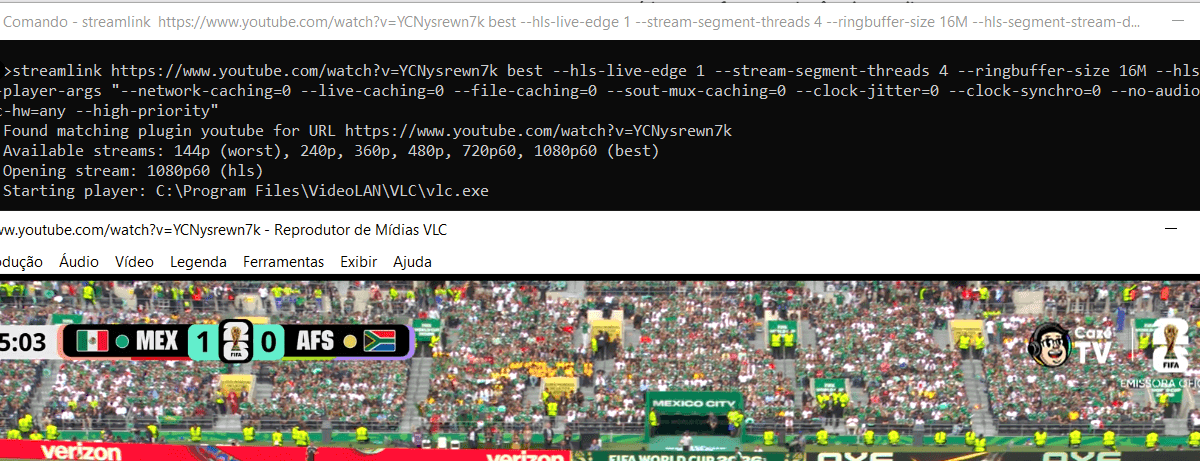

Comando para assistir qualquer live do YouTube com latência mínima pelo VLC Player.
- Baixe e instale https://streamlink.github.io/
- Baixe e instale https://www.videolan.org/
- Abra o CMD (prompt de comando) e cole o comando abaixo (substitua URL pelo link da live do YouTube).
[streamlink URL best –hls-live-edge 1 –stream-segment-threads 4 –ringbuffer-size 16M –hls-segment-stream-data –player-args “–network-caching=0 –live-caching=0 –file-caching=0 –sout-mux-caching=0 –clock-jitter=0 –clock-synchro=0 –no-audio-time-stretch –avcodec-hw=any –high-priority”]
Ao executar esse comando, o seu player de vídeo ignora qualquer margem de segurança para evitar travamentos. A latência será a menor possível, se a sua conexão oscilar minimamente ou se o servidor do YouTube tiver uma pequena queda, o vídeo irá travará imediatamente, pois não há buffer para compensar falhas.



![[NVR caseiro] Como gravar remotamente câmeras IP chinesas em PC antigo](https://som2nynetwork.com/wp-content/uploads/2026/08/lightnvr-tailscale-336x220.png)
