Plenty of people talk themselves out of YouTube before they ever hit record.
They assume they need a good camera, soft lighting, and editing skills, so they never even begin. And while those things add to the overall viewing experience, they’re not always necessary — and the data proves it.
Here’s the short version: a YouTube SEO strategy comes down to three things — pick a topic people actually search for, hold their attention once they click, and do the packaging work most creators skip: a corrected transcript, a custom thumbnail, and a title that matches search intent. YouTube’s recommendation system runs on watch time and engagement signals, not production value.
A simple selfie camera and basic room lighting are enough to get your first set of videos out. All it takes is for the person on camera to be a little enthusiastic about the products they’re talking about so the viewer is engaged. Here’s what actually separates top-ranking videos from everything else — and how to find, film, and package one worth watching.
How YouTube Actually Ranks a Video
Recommendations, not search, drive most YouTube viewing. Speaking at CES in 2018, Neal Mohan — then YouTube’s chief product officer — said AI-driven recommendations account for more than 70% of the time people spend watching on the platform. And in a 2021 explainer, YouTube’s VP of engineering Cristos Goodrow confirmed that recommendations drive more overall viewership than channel subscriptions or search, and listed the signals the system learns from: clicks, watch time, survey responses, shares, likes, and dislikes. YouTube added watch time as a recommendation signal in 2012.
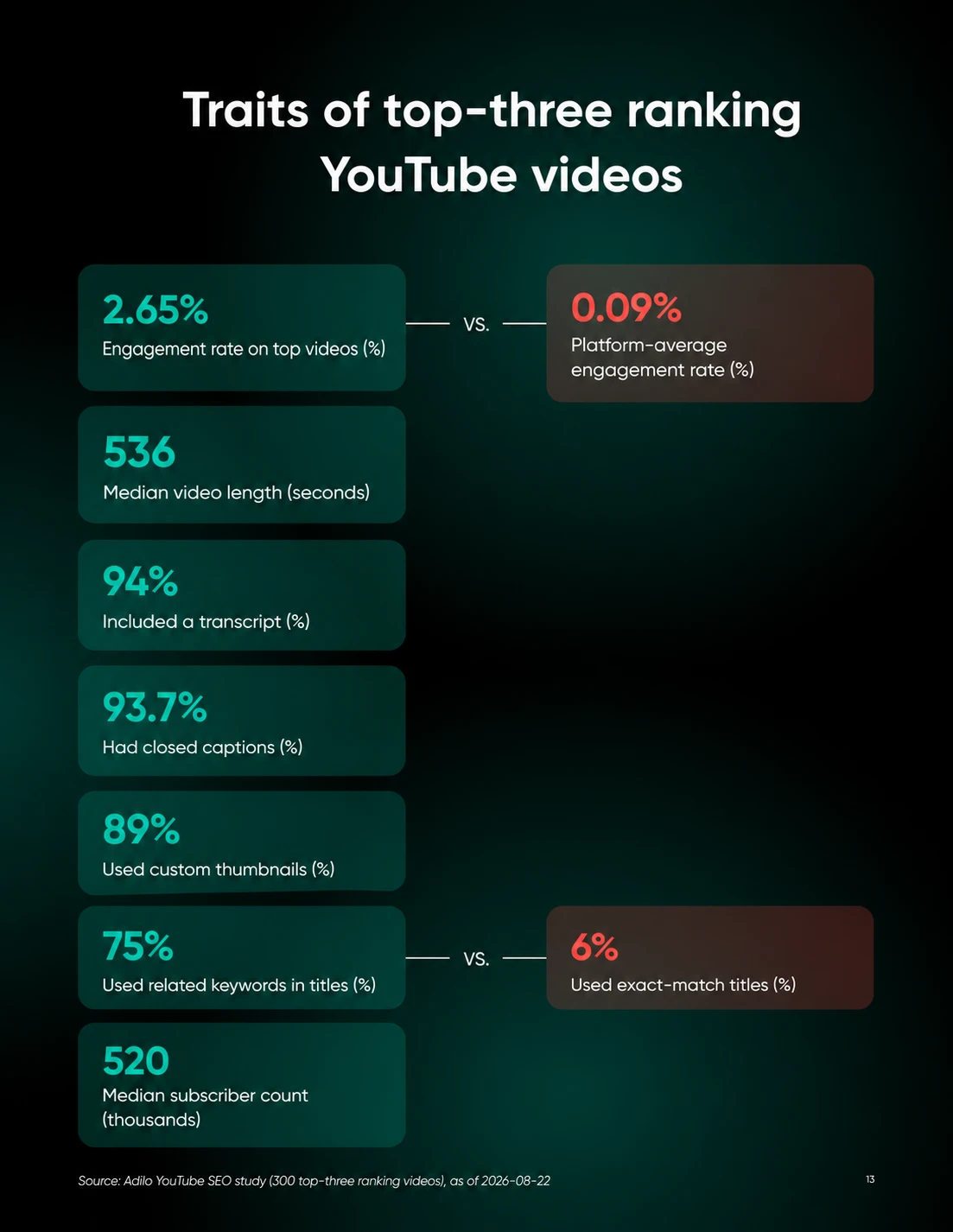
For a concrete picture of what top-ranking videos look like, the most useful data comes from a study by video hosting platform Adilo, which analyzed 1.6 million videos and focused on 300 that ranked in the top three for competitive keywords across 10 categories.
What makes this data useful is the gap it reveals, not between good and bad videos, but between the top performers and everything else. Each signal below shows exactly where that gap opens.
- Engagement: Top-three videos averaged a 2.65% engagement rate, against a platform-wide average of 0.09% (a Social Status figure the study cites). Channels hosting those top videos averaged 4.46%. That gap is roughly 30 times the platform norm.
- Video length: The median length of top-three videos was 536 seconds — between 8 and 9 minutes. Longer does not automatically mean better; what matters is that the video fills the time with value rather than padding.
- Transcripts and captions: 94% of top-ranking videos included a transcript, and nearly as many (93.7%) had closed captions. YouTube can auto-generate captions, but adding a corrected transcript gives the platform a cleaner text signal about what the video actually covers.
- Custom thumbnails: 89% of top-ranking videos used custom thumbnails rather than auto-generated stills.
- Exact-match keywords in titles: Only 6% of top-ranking videos had titles with exact keyword matches. 75% used related keywords that addressed search intent without copying the query word-for-word. Matching what the searcher actually wants matters more than repeating the exact phrase.
- Channel and video age: Top-ranking videos came from channels with a median age of 111 months — over nine years — and a median subscriber count of 520,000, and the median top-three video was itself 29 months old. A new channel can’t shortcut that, but it isn’t a locked door either: 4% of top-ranking videos came from channels with fewer than 1,000 subscribers.
Notice how these signals run from hardest to easiest to build. You can’t manufacture a nine-year-old channel, but you can add a transcript and a custom thumbnail to every upload starting today — and that’s exactly the work most channels still skip.
Finding What to Make a Video About
You’re looking for a topic that sits at the intersection of three things: real search volume, a format where video beats text, and a gap the current top videos have not closed.
Here’s the process, step by step:
Step 1: Pull Raw Topic Ideas From Autocomplete
Type your category into the YouTube search bar itself and write down every autocomplete suggestion. This is free, it takes five minutes, and it is the platform telling you, in its own words, what real people are typing right now.
Step 2: Confirm Volume With a Keyword Tool
Autocomplete shows you that a phrase exists. It does not show you how often people search it. Confirm volume before you film, using whichever tier fits your budget (the same workflow we walk through in our keyword research guide):
Step 3: Watch the Top Three Ranking Videos for That Keyword
Open the top three results and actually watch them, or at least skim the transcript. Note what they cover, what they leave out, and how long they take to get to the point.
Step 4: Mine the Comments for the Question Nobody Answered
Scroll the comments on those top three videos specifically looking for a question that keeps coming up but never gets addressed in the video itself. That unanswered, repeated question is frequently a better topic than anything autocomplete handed you in Step 1, because it’s documented, unmet demand rather than a guess.
Step 5: Run the “Watch Versus Read” Filter Before Committing
Ask whether someone would genuinely rather watch this than read it. Assemblies, comparisons, before-and-afters, anything involving hands or movement passes this filter easily. A pricing breakdown or a glossary of terms usually fails it, and forcing it into video format wastes the one advantage video has over a blog post.
If your topic survives all the steps here, you can assume you have a good topic at hand.
Making the Video Earn Its Click
Once you have the topic, start following this simple process.
Put the keyword — or a close, natural variant of it — in the title. Remember the study data: only 6% of top-ranking videos matched the query word-for-word, so write for the searcher’s intent, not the exact string.
Also write a good description that includes the topic and an explanation of what you cover, so YouTube understands the video well without having to go through the transcript. Then consider uploading a corrected transcript: 94% of the sampled top-ranking videos included a transcript, and 93.7% had closed captions.
Tags barely matter anymore, so do not spend time there. That’s not our opinion — YouTube’s own help documentation says tags “play a minimal role in your video’s discovery” and that the title, thumbnail, and description are the more important pieces of metadata.
Spend that time on the thumbnail instead.
YouTube says half of all channels and videos on the platform have an impressions click-through rate between 2% and 10%. A thumbnail’s only job is to make a scrolling thumb stop, with one face, one contrast, or one bold word doing the work in under a second. But a thumbnail that oversells what the video delivers works against you: per that same YouTube help page, clickbait videos tend to get high click-through rates but low average view duration — and videos with low average view duration are less likely to be recommended.
In other words, YouTube weighs the click and what happens after it together. Earn the click with an honest preview of the payoff, and the algorithm will continue to reward you.
And don’t over-polish. Prioritize holding viewers’ attention over polishing for polish’s sake: watch time is one of several signals YouTube’s recommendation system learns from.
The Metrics to Check Before You Move On
Once a video is live, there are three numbers in YouTube Studio that you need to keep an eye out for:
- Audience retention shows the exact second people leave, which tells you what to cut next time.
- Click-through rate tells you whether the title and thumbnail are pulling their weight.
- Share rate tells you whether the video was good enough that someone spent their own social capital passing it along.
Pull up the retention graph and look for the exact second where the line drops hardest. That single drop usually points to something concrete: a slow introduction, a tangent, a clumsy cut, and fixing that one moment in your next video is worth more than any amount of guessing about keywords.
One more check that lives outside YouTube Studio: make sure the page a video sends people to loads fast. A video can do everything right and still lose the viewer in the final 10 feet if the landing page is slow — our guide to speeding up a WordPress site covers the usual culprits.
YouTube SEO FAQs
How do I do SEO for a YouTube video?
Pick a topic with confirmed search volume, write a title and description that match the searcher’s intent, upload a corrected transcript with closed captions, and design a custom thumbnail that honestly previews the payoff. In Adilo’s study of top-ranking videos, 94% had transcripts and 89% used custom thumbnails — the two easiest signals to copy on day one.
Are videos good for SEO?
They can be — when the topic is genuinely better watched than read. Assemblies, comparisons, and demonstrations hold attention in ways text can’t, and a video competes in YouTube’s own search and recommendation system on top of your website’s presence in Google. A pricing table or glossary, on the other hand, is usually better as a page than a video.
How long should a YouTube video be to rank?
The median length of videos ranking in YouTube’s top three positions is 536 seconds — between 8 and 9 minutes — according to Adilo’s study of 300 top-ranking videos. Treat that as a description of this sample, not a ranking target: make the video only as long as needed to deliver its value.
What is a good click-through rate on YouTube?
YouTube’s own help documentation says half of all channels and videos on the platform have an impressions click-through rate between 2% and 10%. Context matters: a video shown broadly (like on the homepage) naturally sees a lower rate, so compare your videos against each other over time rather than against a single universal number.
Do tags and hashtags help YouTube SEO?
Barely. YouTube’s help documentation says tags play a minimal role in discovery — they’re mainly useful for commonly misspelled terms — and that the title, thumbnail, and description matter more. Adilo’s study did not measure how much hashtags help; it found that only 37% of sampled top-three videos used them.
How long does it take for a YouTube video to rank?
There is no fixed timeline. Adilo’s study did not measure how long videos took to rank; it found that the median top-three video was 29 months old, 91% were at least six months old, and 9% were younger than six months.
Consistency Beats Production Value
The signals that separate top-ranking videos from everything else run from hardest to easiest to build — channels with a median age of nine-plus years and engagement roughly 30 times the platform average at one end, transcripts and custom thumbnails at the other. You can’t shortcut channel age. But you can add a corrected transcript to every upload starting today.
The practical takeaway is to apply the controllable practices that were common among the study’s top-ranking videos. Pick one repeatable format — a weekly walkthrough, a regular comparison series — and hold the schedule. It teaches the algorithm what you make and teaches your audience when to show up. (For the promotion side of building a channel, our YouTube marketing guide picks up where this one leaves off.)
And make sure whatever page your video points to holds up its end. A viewer who clicks through to a slow site leaves before the sale — every DreamHost web hosting plan runs on NVMe SSD storage with unmetered bandwidth and a built-in traffic dashboard, so you can see exactly what your videos send your way.

Search Beyond Search Engines
Pinterest, YouTube, and the alternative discovery channels your customers already use. Get found in the five places people search besides Google, with a 90-day plan to run it all as one system.
Did you enjoy this article?